USPS says that if a carrier could not complete a delivery and left a PS Form 3849 notice, you can schedule a free redelivery online, by phone or on the form itself, but you choose a day, not a time, and the item goes back to the sender after the return date unless you arrange a redelivery or pick it up. The notice is the starting point, and the dates on it matter more than the method you use.
This article compares four USPS sources: the USPS FAQ “Redelivery – The Basics” (Article 000005320, dated September 16, 2026), the FAQ “What are the Second and Final Notice and Return Dates for Redelivery?” (Article 000006169, dated April 7, 2026), the FAQ “PS Form 3849 Redelivery Notice” (Article 000006180, dated June 29, 2026) and the USPS.com page “Schedule a Redelivery” (no update date shown). The wording is as of November 20, 2026. The sources overlap but do not always agree, and the article shows where they differ instead of choosing one. It gives no prices or fees. It does not cover delivery to a USPS Smart Locker beyond what the notice says, international or customs items, perishable parcels, or the USPS Delivery Instructions service itself.
What the notice is and when you get one
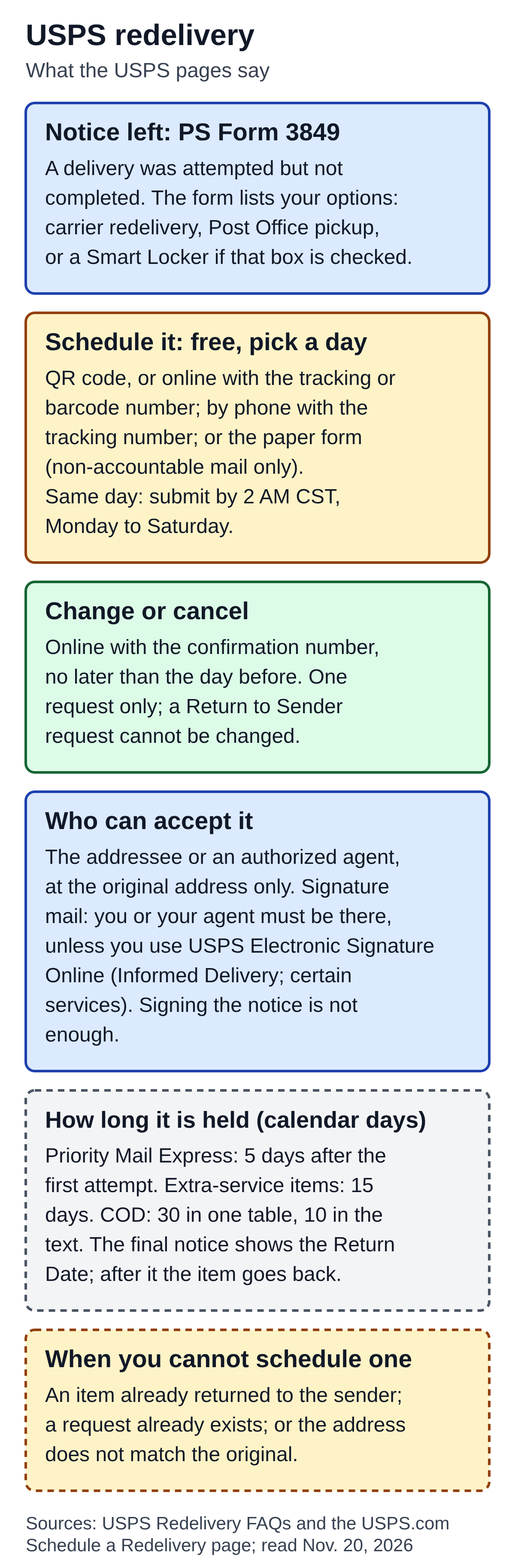
USPS calls the form PS Form 3849, “We ReDeliver for You!” The FAQ says it is left when a delivery was attempted but not completed, and it lists the reasons: the mail receptacle (mailbox, cluster box, parcel locker and so on) was full; no parcel locker was available; the item was too large for the receptacle; a signature, postage or fees were required; or the item could not be left in a secure place. The notice tells you what kind of mailpiece was attempted, why it was not left, and which options you have: a carrier redelivery, pickup at the Post Office, or, if the “Smart Locker Eligible” box is checked, a USPS Smart Locker. A yellow version, PS Form 3849-SD, is used when the attempt was made on a Sunday; the FAQ says the item is then available at the Post Office on the next business day (excluding holidays) or can be scheduled for redelivery with the QR code on the form.
Redelivery happens after the first attempt. The FAQ separates it from USPS Delivery Instructions, which lets you set delivery options before an item has been attempted. Our tracking status article explains the tracking statuses that go with these notices; this article covers the scheduling rules.
How to schedule a redelivery
| Way | What you need | What the pages say |
|---|---|---|
| QR code on the form | A phone that can scan it | The FAQ calls it the quickest way to choose your options; the code opens the redelivery page |
| Online | The tracking number or the barcode number on the notice | The USPS.com page says redeliveries can be scheduled 24 hours a day, 7 days a week, and that the address must match the original delivery address. In USPS Tracking, the redelivery option appears under “Available Actions” only if the item is eligible |
| By phone | The tracking number from the notice | Only three options are available by phone: carrier redelivery, customer pickup and return to sender. A Smart Locker is not available by phone. Without a tracking number, the representative can only notify your Post Office |
| On the paper form | The notice itself | Non-accountable mail only: fill in the back, pick a day at least 2 delivery days ahead, say where the item may be left, sign, and put the form in your mailbox. Not available for Restricted Delivery or Adult Signature items, on the Sunday form, or for items eligible for a Smart Locker |
| At the Post Office | The notice and a valid photo ID | Picking the item up no later than the day before a scheduled redelivery cancels that redelivery |
You do not need the paper notice if you have a tracking number or barcode number; the FAQ points to a separate page on finding it. It also says that if you have signed up for Informed Delivery, you can manage redeliveries there. Our Informed Delivery article says it does not cover redelivery.
The FAQ says redelivery is available in many, but not all, areas. On the USPS.com page you enter your name, address, phone number and email address and select “Check Availability” before you schedule.
Cutoffs, dates and changes
You pick the day, not the time: the FAQ says items are delivered on the requested date but you may not request a specific time. For same-day redelivery, both the FAQ and the USPS.com page say to submit the request by 2 AM CST, Monday through Saturday; the page adds that otherwise the redelivery is scheduled for the next day.
The requested date can be up to the day the item is scheduled to go back to the sender. On a final notice, that is the “Return Date” under “About the missed delivery.” The same FAQ then adds that scheduling must be done with advance notice and not on the date the item will be returned (see “Where the pages differ” below).
To change or cancel an online request, the FAQ says to do it no later than the day before the scheduled redelivery, using the link in the confirmation email (“Edit this request”), the “Edit an existing redelivery request” option on the Redelivery page, or the Activity History in your USPS.com account. You need the confirmation number the page and the email give you. To switch to pickup, change “Carrier Redelivers” to “Customer will pick up.”
The FAQ’s list of error messages adds three limits. There is a maximum of one redelivery request; if one exists, you edit it instead of making a second. A Return to Sender request cannot be canceled or modified once submitted. And a request session that has expired has to be restarted. If bad weather affects a scheduled redelivery, the FAQ says the item will be redelivered the next business day. If an attempt on the last day before the return date fails, the item is returned to the sender. If a scheduled redelivery did not happen, the FAQ says a service request may be sent by email to your local Post Office for follow-up.
Who can accept it
The FAQ says a residential redelivery goes to the addressee or the addressee’s agent, and that the item can be redelivered only to the original address on the mailpiece. An agent is a person you authorize either on PS Form 3801 (Standing Delivery Order) or in a letter to the postmaster; at the Post Office, the agent needs acceptable identification. The FAQ adds that the carrier is not required to check whether a person accepting a package at the home or business is truly the authorized agent. For a pickup, you can also name someone on the notice itself by signing the form and writing the person’s name; that option is not available for Registered Mail or Restricted Delivery.
For accountable mail (items that require a signature or the payment of fees), the PS Form 3849 FAQ answers “Do I have to be present to sign for my mailpiece?” with “Maybe.” If you are an Informed Delivery subscriber, you can sign up for USPS Electronic Signature Online, which lets you sign electronically for domestic Priority Mail Express items, Signature Confirmation items and insured items over a stated value. Otherwise, the FAQ says you or an authorized agent must be present to sign for accountable mail delivered by a carrier. Both FAQs say that signing the notice and leaving it for the carrier does not meet the minimum requirements for redelivery. For businesses, an individual employee must sign; the business itself cannot, and the carrier must be able to enter the signer’s first initial and last name. Our Certified Mail article covers who signs for that service.
What gets a notice, and how long items are held
The FAQ says accountable mail needs a signature or a payment, so those items get a redelivery notice: Adult Signature, Collect on Delivery (COD), Registered Mail, Certified Mail, Signature Confirmation, Restricted Delivery, Return Receipt, domestic Priority Mail Express (the FAQ adds “unless signature waiver is not required,” wording it does not explain), and insured mail above a value the FAQ states. Non-accountable mail, such as uninsured packages, USPS Tracking items and perishable items, can be left when the carrier believes it can be left securely.
The “Second and Final Notice” FAQ gives the schedule for items with extra services. The return date counts calendar days unless the FAQ says otherwise, and if it falls on a day that is not a Postal business day, the item goes back on the next Postal business day.
| Mail type | Second or final notice | Held after the first attempt |
|---|---|---|
| Priority Mail Express | 3 days after receipt of the first notice | 5 days |
| Certified Mail, Insured Mail, domestic Registered Mail, Signature Confirmation, Adult Signature Required, Return Receipt for Merchandise, USPS Tracking | 5 days after receipt of the first notice | 15 days |
| Collect on Delivery (COD) | 5 days after receipt of the first notice | 30 days in the table (10 days in the text; see below) |
| Postage Due | 5 days after receipt of the first notice | 15 days |
Carriers leave two notices, a first and a final, whether or not you schedule a redelivery. If you schedule after the first notice and are not home, the carrier leaves the final one; if you schedule after the final notice and are not home, no further notice is left. The “Final Notice” box is checked on the peach form, and the carrier does not have the item with them when that notice is left. The item stays available at the Post Office until close of business on the return date and goes back to the sender at close of business.
For an ordinary parcel with no extra services, the first FAQ describes a different pattern. When someone is normally available to receive parcels, a second attempt is made the next working day and no notice is left on the first attempt; a notice is left after the second. If the carrier knows nobody is usually available, or does not know, the notice is left after the first attempt, and further attempts are made only at your request. For Priority Mail Express, the FAQ says there are no automatic attempts after the first; a second notice is left on the third calendar day, and the item is returned if you have not picked it up or scheduled a redelivery by close of business five calendar days after the first attempt. For signature mail, the second notice comes five days after the first, and the item is held for a number of days based on the service, usually 15.
When you cannot schedule one
Only items with certain tracking events can be redelivered, according to the FAQ: Available for Redelivery or Pickup, Notice Left, Receptacle Blocked, Receptacle Full / Item Oversized, No Secure Location Available, No Authorized Recipient Available, and Reminder to Schedule Redelivery. “Available for Pickup” appears in the same list with the note “(Customer Pickup and Returned to Sender Only).” The FAQ gives these reasons you may be unable to schedule: the address you enter does not match the original delivery address, a request already exists, or the package was returned to the sender. Its list of error messages also shows the statuses Refused (by recipient), Delivered and Out for Redelivery right after the reasons a package is not eligible, without explaining them, and one message says a package has exceeded the allowed number of redelivery attempts and should be picked up before the Return to Sender date. Once a redelivery is set, the tracking events are “Prepared for Redelivery” and “Out for Redelivery.”
Where the pages differ
- Scheduling on the return date. The “Redelivery – The Basics” FAQ says the requested date can be “up to” the day the item is scheduled for return, and in the next breath says scheduling must not be done on that date. The FAQ does not say which day is the last one that can be booked, and this article does not decide it.
- How long COD is held. The Second and Final Notice FAQ says in its text that COD is held for 10 days (unless the mailer sets fewer, or it includes Hold For Pickup), and in its table lists 30 days. It also says accountable mail is returned after 15 days. The page does not explain the difference.
- The change deadline. The FAQ says to modify or cancel no later than the day before the scheduled redelivery. One of its error messages refers to a 2 AM CST cutoff for changes. The FAQ does not say how the two fit together.
- A second attempt. The FAQ says an ordinary parcel gets a second attempt the next working day, and that signature mail does not get an automatic one. Our tracking status article reports the tracking guide saying there is no automatic second attempt after the two “Notice Left” statuses. These describe different situations: one before a notice is left, the other after.
What the pages do not say
The pages give no list of the places where redelivery is available, and they do not say how long the service request email to the Post Office takes to be answered. The tracking status guide, as our tracking status article reports, gives no time limit for claiming an item; the “Second and Final Notice” table is where these pages give return dates, and it covers items with extra services, Priority Mail Express, postage due and a few other types. This article gives no fee or price.
Sources
The pages were checked on November 20, 2026.
- USPS FAQ, “Redelivery – The Basics,” Article 000005320, dated September 16, 2026. https://faq.usps.com/s/article/Redelivery-The-Basics
- USPS FAQ, “What are the Second and Final Notice and Return Dates for Redelivery?,” Article 000006169, dated April 7, 2026. https://faq.usps.com/s/article/What-are-the-Second-and-Final-Notice-and-Return-Dates-for-Redelivery
- USPS FAQ, “PS Form 3849 Redelivery Notice,” Article 000006180, dated June 29, 2026. https://faq.usps.com/s/article/PS-Form-3849-Redelivery-Notice
- USPS.com, “Schedule a Redelivery” (no update date shown). https://tools.usps.com/redelivery.htm