Category: Postal service and stamps

  • USPS Smart Locker vs. Parcel Locker: Three Kinds of USPS Lockers

    USPS pages use “locker” for three different things: a USPS Smart Locker in a Post Office lobby that opens with a one-time QR code, a gopost unit that needs a registered account, a card and a PIN, and a parcel locker inside a cluster box unit that you open with a key the carrier leaves in your mailbox. For a Smart Locker, USPS says a package other than Priority Mail Express stays in the locker for 5 calendar days, is then held at the retail counter for 10 more days, and is returned to the sender 15 days after the first notification. Priority Mail Express has its own count: the USPS FAQ says it is returned to the sender 5 calendar days after the first delivery attempt, while USPS.com says after 5 days in the locker. This article shows where the pages differ.

    This article compares what USPS says about the three, as of November 24, 2026. It uses the USPS FAQ “USPS Smart Locker” (Article 000008414, dated July 28, 2026), the FAQ “What is a Cluster Box? What is a Parcel Locker?” (Article 000006975, dated August 4, 2026), the FAQ “gopost” (Article 000007973, dated October 22, 2026), three USPS.com Smart Lockers pages (for package recipients, for package shippers and USPS Local XChange, none showing an update date) and three redelivery FAQs. It gives no prices or fees, does not say where lockers are, and does not cover the USPS.com page for businesses and its shipping integrations.
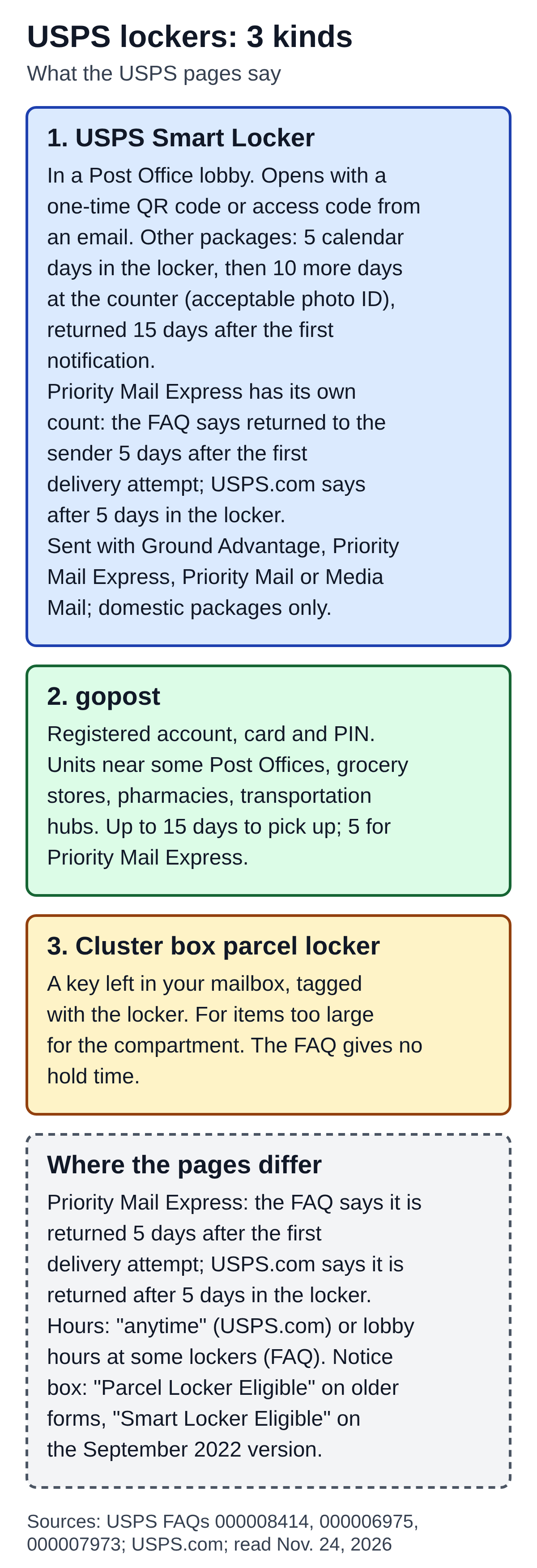
    Diagram of the three kinds of locker USPS pages describe. USPS Smart Locker: in a Post Office lobby; opens with a one-time QR code or access code from an email; other packages: 5 calendar days in the locker, then 10 more days at the retail counter with acceptable photo ID, returned to the sender 15 days after the first notification. Priority Mail Express has its own count: the FAQ says it is returned to the sender 5 days after the first delivery attempt, USPS.com says after 5 days in the locker. Eligible: Ground Advantage, Priority Mail Express, Priority Mail, Media Mail; domestic packages only. gopost: registered account, card and PIN; units near some Post Offices, stores and transport hubs; up to 15 days, 5 for Priority Mail Express. Cluster box parcel locker: a key left in your mailbox, tagged with the locker number; for items too large for the compartment; the FAQ gives no hold time. The pages differ on where the Priority Mail Express count starts and on hours.

    The three lockers side by side

    USPS Smart LockergopostCluster box parcel locker
    WherePost Office lobbiesNear certain Post Offices, grocery stores, pharmacies, transportation hubs and moreIn a cluster box unit, beside neighborhood delivery and collection boxes, or with PO Boxes in a retail facility
    How it opensOne-time QR code or access code from an emailgopost card and PINA key left in your mailbox, tagged with the locker
    AccountNo account step named for pickupUSPS.com account, then authenticationNot described
    Time to pick upOther packages: 5 days in the locker, 10 more at the counter. Priority Mail Express: 5 days, counted from the first delivery attempt (FAQ) or in the locker (USPS.com)Up to 15 days (5 for Priority Mail Express)Not stated

    The FAQ calls a Smart Locker “electronic” and “keyless,” and says it provides a “free, secure, and convenient” alternative at Post Offices. The gopost FAQ calls gopost units “automated, secured, self-service parcel lockers” placed in locations such as near Post Offices, grocery stores, pharmacies and shopping centers. The cluster box FAQ defines a parcel locker as a unit installed within a cluster box unit, alongside neighborhood delivery and collection box units, or with PO Boxes in a retail facility, used for parcel and package deliveries.

    How a package gets to a Smart Locker

    USPS pages describe three routes. From an online store that ships with USPS and offers it, you choose a Smart Locker at checkout. From an individual sender, the sender uses Click-N-Ship or a Post Office self-service kiosk, picks a Smart Locker near you and enters your email address. And a package with a notice can be redelivered to a locker: the FAQ says you can schedule that at usps.com/redelivery, that the option appears only if your local Post Office has a Smart Locker, and that redelivery to a locker cannot be scheduled for another location. The redelivery FAQ adds that a Smart Locker is not available when you request redelivery by phone. Our article on USPS Redelivery: How to Schedule It, Cutoffs and Return Dates covers the other redelivery options.

    USPS.com lists these conditions for a package sent to a Smart Locker:

    • The sender must use USPS Ground Advantage, Priority Mail Express, Priority Mail (and their corresponding Return services) or Media Mail. Commercial senders can also use Bound Printed Matter and Library Mail.
    • Domestic packages only: “No cards, letters, or anything that requires a customs form.”
    • The sender must have the recipient’s email address, because the pickup notice and QR code go there.
    • The package must fit. USPS.com says the absolute maximum size for a package shipped to a Smart Locker is 22.5 by 18 by 16.5 inches, and that some lockers have smaller limits. The FAQ says the maximum compartment size varies by locker and the maximum weight is 70 pounds.
    • If a package cannot be delivered to a Smart Locker, the FAQ says it is held at the Post Office retail counter and the recipient gets an email with the location and instructions.

    The FAQ also says Informed Delivery subscribers with a package for a Smart Locker see it in the Daily Digest email if the email address on the package matches the account’s. The digest shows tracking beginning within 3 days of delivery, a note that the package is in a locker and a one-time QR code that stays until pickup and expires after 5 calendar days. For what the digest is, see What Is USPS Informed Delivery? How the Free Preview Works.

    Picking up, and the clock

    The pickup email has the address and hours of the Post Office, a one-time QR code or access code and instructions. You scan the code at the locker kiosk and the compartment opens. A final email confirms the pickup. The FAQ says the package is held in the locker for 5 calendar days, with a reminder email every day. If you are unable to pick it up in time, you may share your QR code with a trusted person to pick it up for you.

    After 5 days, the FAQ says the package is removed from the locker and held at the Post Office retail window for 10 more days, and you bring an acceptable form of identification to the counter. The USPS.com recipient page gives the same timeline: 5 days in the locker, 10 more days at the counter, and return to the sender 15 days after the initial notification. Both describe packages other than Priority Mail Express; the pages treat that service separately (see “Where the USPS pages differ”). In its Local XChange section the FAQ words the end of that clock as follows: at 15 days the package is treated as Undeliverable as Addressed and USPS attempts to mail it back to the seller.

    If the QR code does not arrive, the FAQ says to check deleted or junk email, visit the Post Office during retail hours, or call 1-800-ASK-USPS to have the email resent. If it does not scan, it says to brighten the phone screen and clean it, or to enter the six-digit access code printed under the QR code. If neither works, a USPS employee at the location can help during retail hours.

    On hours, the FAQ says Smart Lockers in Post Office lobbies give many recipients 24/7 access, that lobby hours are in the pickup email, and that After Hours Access, which it calls free, is available at select Post Offices where the lobby is not open around the clock. The USPS Local XChange page says “many” kiosks are available 24/7 and “some are only available during lobby hours.”

    Sending from a Smart Locker

    The FAQ says you can return a package from a Smart Locker if you have a Label Broker QR code for a return: you scan it at the locker to print a label, attach it, scan the new label and put the package in a compartment.

    USPS Local XChange connects local sellers and buyers, who exchange an item through a Smart Locker. The USPS.com page says the seller needs a free USPS.com account, the locker must be within 50 miles of the seller’s return address, the buyer gives the seller a name and valid email address, and the item must be packaged in a box or polybag and fit the compartment. The seller pays a flat fee, which this article does not give. The FAQ gives the buyer the same 5 days in the locker and 10 more days at the counter, with the package mailed back to the seller 15 days after the initial notification, and that the label cannot be refunded once it has been scanned at the kiosk. The FAQ also lists items that cannot be used: cremated remains, live animals, day-old poultry, perishables, hazmat items affected by extreme temperature and “Restricted Matter.” The seller and buyer cannot use the same contact information.

    gopost and the cluster box locker, briefly

    For gopost, the FAQ says you register with a free USPS.com account, then authenticate, either at a gopost unit by scanning a driver’s license or state ID, or at a Post Office with a government-issued photo ID. You get an account number, a card and a PIN, you are not assigned a specific locker, and the units are available 24 hours a day, 7 days a week “as long as the gopost unit is operational and available to the public.” When you order, the address uses your name, your gopost account number and the gopost unit’s address. You have a maximum of 15 days to pick up (5 for Priority Mail Express), after which the package is returned to the sender. The FAQ lists extra services it does not accept, including Certified Mail, Registered Mail, Adult Signature and Restricted Delivery.

    For a cluster box, the FAQ says the parcel locker is for items too large to fit in an individual compartment. A key is left in your mailbox with a tag showing the parcel locker that holds the item; you insert it in that locker, and the key stays in the locker once inserted. Letter carriers deliver accountable mailpieces to the point of address instead. The FAQ gives no hold time for this kind. Our article on USPS Tracking Status reports the tracking guide’s version of the same key rule. For PO Box customers, our How Does a USPS PO Box Work? Sizes, ID and Service Periods article reports that USPS.com says an oversized package goes either to the counter by slip or to a secure parcel locker, including USPS Smart Lockers at select locations.

    Why the names overlap on the notice

    The redelivery notice (PS Form 3849) has a locker box whose label changed. The PS Form 3849 FAQ says the February 2021 version let the carrier check “Parcel Locker Eligible” for a gopost parcel locker, and the September 2022 version updates that checkmark to “USPS Smart Locker Eligible.” It adds that earlier versions are still in use. The Redelivery FAQ still uses both names: it says the “Parcel Locker Eligible” option is checked if the item is eligible for gopost Parcel Locker Delivery, which is available only at limited ZIP Codes, and also that “Parcel Locker Eligible” is checked on the form if the “USPS Smart Locker” option is available. A notice with an older form or the old label does not tell you which kind of locker it means, and this article does not say how to tell.

    Where the USPS pages differ

    • Priority Mail Express. The FAQ says Priority Mail Express items are returned to sender 5 calendar days after the initial delivery attempt, “no matter when the ‘USPS Smart Locker’ option is selected.” The redelivery FAQ’s table also says Priority Mail Express is held 5 days after the first attempt. USPS.com’s recipient and shipper pages say that after 5 days in the locker “Priority Mail Express packages will be immediately returned to sender.” So the pages give different points for the count to start: the first delivery attempt in the FAQs, and time in the locker on USPS.com. This article does not say which one applies. If the deadline is close, ask the Post Office that holds the package.
    • Hours. The USPS.com recipient page says you can retrieve packages “anytime, anywhere.” The FAQ and the Local XChange page say lobby hours apply at some locations. This article does not say which locations.
    • Size. USPS.com’s recipient and shipper pages give an absolute maximum of 22.5 by 18 by 16.5 inches for a package shipped to a locker. The Local XChange page gives a maximum compartment size of 22.5 by 19.5 by 14.5 inches. The FAQ says the maximum varies by locker and that Click-N-Ship shows the limit for the locker you choose.

    What the pages do not say

    They do not say how many Smart Lockers a Post Office has or how to know a locker is free before a notice arrives, and they do not say how to tell on an older notice which kind of locker is meant. They give no hold time for a cluster box parcel locker. They do not say whether ID is checked at the locker itself or only at the counter after 5 days, and they do not say how the locker treats a QR code that has been shared.

    Sources

    All pages were read on November 24, 2026.

  • USPS Return to Sender: Refused, Misdelivered, Undeliverable

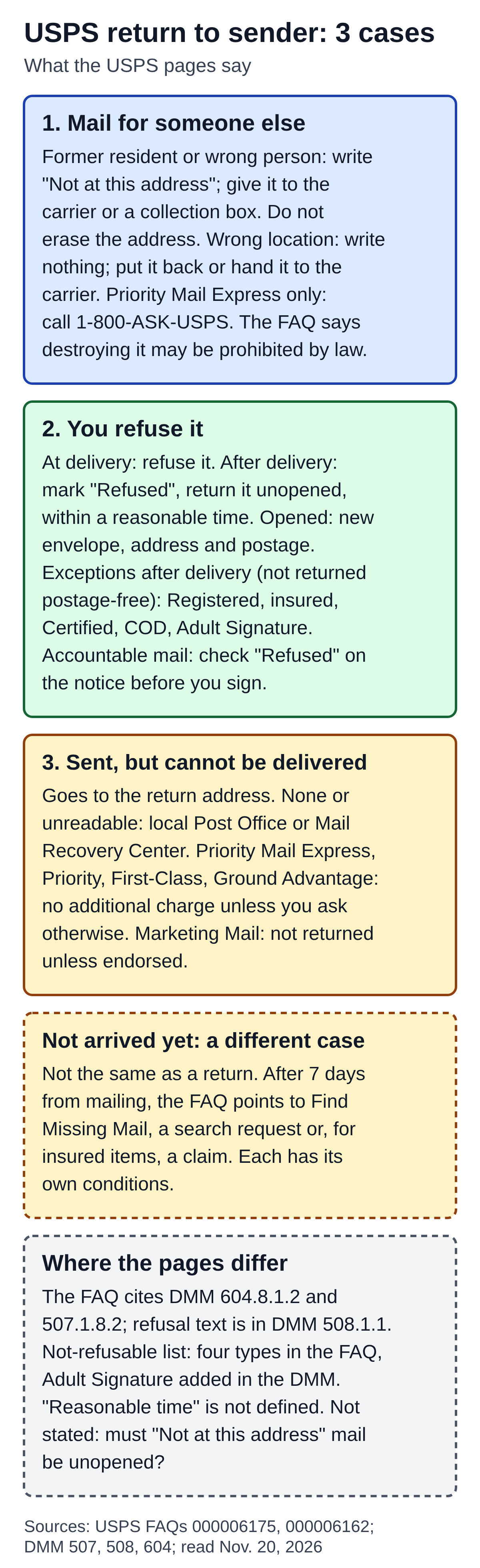
    USPS pages do not describe one “return to sender” process. They describe three situations with different rules: mail that reached you but is not yours, mail you want to refuse, and a sender’s mail that could not be delivered. The marking, the postage and the limits are different in each, and several of the pages’ rules do not match each other word for word.

    This article compares what two USPS FAQs and the Domestic Mail Manual (DMM) say: the FAQ “How is Undeliverable and Misdelivered Mail Handled?” (Article 000006175, dated May 19, 2026), the FAQ “Refuse unwanted mail and remove name from mailing lists” (Article 000006162, dated September 3, 2026), and DMM 508 (recipient options), 507 (returning mail and dead mail) and 604 (postage), read as posted on Postal Explorer on November 20, 2026. The DMM pages show no update date. It reports what the pages say and does not decide which wording governs.

    What USPS pages say about return to sender, which they treat as three situations. 1, mail for someone else: for a previous resident or a person who does not live there, write 'Not at this address' and give it to the carrier or a collection box, without erasing the address; for a piece delivered to the wrong location, write nothing and put it back or hand it to the carrier; for Priority Mail Express only, call 1-800-ASK-USPS; the FAQ says destroying mail not meant for you may be prohibited by law. 2, you refuse it: refuse it when offered, or after delivery mark it 'Refused' and return it unopened within a reasonable time; an opened piece needs a new envelope, correct address and new postage; Registered, insured, Certified, COD and Adult Signature mail cannot be returned postage-free after delivery; accountable mail can be refused before signing by checking 'Refused' on the notice. 3, you sent it and USPS cannot deliver it: it goes to the return address; with none, the local Post Office or the Mail Recovery Center handles it; Priority Mail Express, Priority Mail, First-Class Mail and USPS Ground Advantage are returned at no additional charge unless the sender asks otherwise; USPS Marketing Mail is not returned unless endorsed. Separate case, not arrived yet: this is not the same as a return; if it has not arrived within 7 days from mailing, the FAQ points to Find Missing Mail, a search request or, for insured items, a claim, each with its own conditions. Where the pages differ: the refusal FAQ cites DMM 604.8.1.2 and 507.1.8.2 but the refusal text is in DMM 508.1.1; the FAQ's not-refusable list has four types and the DMM adds Adult Signature; a reasonable time is not defined; the pages do not say whether 'Not at this address' mail must be unopened. Sources: USPS FAQs 000006175 and 000006162 and DMM 507, 508 and 604, read Nov. 20, 2026.

    Three situations, three sets of rules

    SituationWhat the pages say you can doWhere it comes from
    Mail came to your address but is for someone elseWrite “Not at this address” and hand it to your mail carrier or put it in a collection box, or, if it was delivered to the wrong location, put it back unmarkedFAQ 000006175
    You are the addressee and do not want the mailRefuse it when it is offered. After delivery, mark it “Refused” and return it unopened within a reasonable time, unless it is a type the DMM says cannot be refused and returned postage-free (Registered Mail, insured mail, Certified Mail, COD, Adult Signature) or it has been openedFAQ 000006162, DMM 508.1.1
    You sent it and USPS could not deliver itUSPS tries to return it to the return address; with no usable return address, the local Post Office or the Mail Recovery Center handles itFAQ 000006175, DMM 507.1.8 and 507.1.9

    A piece that has not arrived yet is a different case from one that is being returned. For that, the FAQ points to Find Missing Mail, a search request or, for insured items, a claim, each with its own conditions; see the last part of the section on sending mail.

    Mail came to you for someone else

    The FAQ on refusing mail says USPS “will deliver the mail as addressed,” and that mail is delivered to residential or business addresses even if the name on the piece is different from the known residents. So getting mail with a stranger’s or a former resident’s name is not, by that page’s account, a mistake by itself. The FAQ on misdelivered mail then gives separate instructions for three cases.

    • A previous resident, and you do not know their new address. Return the piece to the mailstream, by leaving it in a collection box or other mail receptacle, with the notation “Not at this address” marked on the envelope.
    • The piece was delivered to the wrong location. Do not erase or mark over the information and do not write any endorsement on it. Put it back in the mailbox or hand it to your mail carrier.
    • The location is right but the person named does not live there. Write “Not at this address” on the piece, do not erase or mark over the address, and give it to your mail carrier or drop it in a collection box.

    The first and third cases read almost the same, and the second case says not to write anything. The FAQ does not explain how to tell the wrong location from the right location with the wrong person, so this article does not either.

    Two exceptions are on the same page. For Priority Mail Express items only, the FAQ says you can get the number of the Priority Mail Express Reporting Unit by calling 1-800-ASK-USPS (1-800-275-8777). And if you receive a “We ReDeliver for You” PS Form 3849 notice for a different address or for someone who does not live at yours, and the correct forwarding address is unknown, the FAQ says to check the “Other” box on the notice, write in “Refused,” and return the form to your mailbox or hand it to your carrier. That is the word “Refused” on a notice, not on a letter, and it is a different instruction from “Not at this address.”

    The FAQ also says destroying mail that was not intended for you “may be prohibited by US laws,” that willfully destroying mail is an act that may be punishable by the federal government, and that questions about legality go to local law enforcement.

    One case works differently. For mail sent to an individual at a business, the FAQ says mail addressed to a company is delivered to the company, including mail endorsed “Personal and Confidential” for a specific person, and that this also applies to mail for former employees. It says USPS responsibility ends at that point and that what happens next follows each company’s policy.

    You are the addressee and want to refuse it

    DMM 508.1.1.2 says the addressee may refuse to accept a mailpiece when it is offered for delivery. DMM 508.1.1.3 covers refusal after delivery: the addressee may mark the piece “Refused” and return it within a reasonable time, if the piece or any attachment is not opened. The FAQ says the same and adds that a piece that has been opened, even if resealed, cannot be marked “Refused” and returned. To send an opened piece back, the DMM and the FAQ both say it has to go in a new envelope or wrapper with a correct address and new postage.

    Some mail cannot be refused and returned postage-free after delivery. The DMM lists Registered Mail, insured mail, Certified Mail, collect on delivery (COD) and Adult Signature pieces, plus response mail to a sales promotion, solicitation, announcement or other advertisement that was not refused when it was offered. The FAQ’s list names Registered, Insured, Certified and COD and the response mail, and says that for the first group “Postage must be paid by the customer” for the mail to be returned.

    The same FAQ adds a note that customers may refuse accountable mail before signing for it: check the box marked “Refused” on the back of the delivery notice, sign your name by the “X,” and place it back in your mailbox. DMM 508.1.1.7 adds that for these services the addressee or a representative may obtain the sender’s name and address while the piece is held by the USPS employee, before accepting delivery and endorsing the delivery receipt. For how these services work in general, see our article on Certified Mail.

    If a recipient wants to add an extra service such as Certified Mail to a piece being returned, the FAQ says they must pay return postage to mail it back in addition to paying for the extra service.

    Postage due is a separate case. The FAQ on undeliverable mail says a shortpaid piece is delivered postage due, and that if the recipient refuses to pay and accept it, it is endorsed “Returned for Additional Postage” and sent to the return address. DMM 604.8.1.2, the section the refusal FAQ cites, covers this: mail with insufficient postage that is refused by the addressee or otherwise undeliverable is returned to the sender with “Returned for Additional Postage” if it is First-Class Mail with a return address, and is treated as dead mail if it has no return address.

    Two other options appear on the refusal pages. The addressee may ask the postmaster in writing to withhold from delivery, for no more than 2 years, any foreign letter or printed matter with a specified name or address on the outside (DMM 508.1.1.4; the FAQ says “foreign letter or publication material”). And the FAQ points to services outside USPS for reducing marketing mail, the mail suppression service DMAchoice, run by the Association of National Advertisers and described as independent of USPS, and the credit-reporting companies’ opt-out for prescreened offers. Those are not USPS actions, and this article does not cover them or give any fee.

    You sent it: mail that is returned, and mail that has not arrived

    For undeliverable mail, the FAQ says that if USPS cannot deliver as addressed, it uses the return address to try to return it. DMM 507.1.8.3 says Priority Mail Express, Priority Mail, First-Class Mail, USPS Ground Advantage Retail and USPS Ground Advantage Commercial pieces that cannot be delivered as addressed or forwarded are, unless the sender asks otherwise, “returned to the sender at no additional charge.” For other classes, DMM 507.1.8.4 says the mail is treated as appropriate for the class and the sender’s instructions.

    A returned piece generally may not be remailed unless it is put in a new envelope or wrapper with a correct address and new postage (DMM 508.1.1.6). The exception is a shortpaid piece, which can have the additional postage affixed to the original. The FAQ says the same for a piece endorsed “Returned for Additional Postage,” and adds that the “postage due” message is left intact.

    The pages describe a few specific reasons for return.

    • Missing or short postage. The FAQ says an item with no postage, or one where postage appears to have fallen off, is endorsed “Returned for Postage Mail” and sent to the return address. It also says greeting cards without a return address generally are delivered with postage due during December rather than routed to the Mail Recovery Center, for domestic First-Class Mail only.
    • A missing apartment number. The FAQ says mail is delivered, as a matter of policy, if any one of four elements is present: the apartment number is on the envelope; the recipient’s name is on or inside the mail receptacle; the name is on the alphabetical directory furnished by apartment management; or the mail carrier recognizes the information and remembers the correct apartment number.
    • USPS Marketing Mail. The FAQ says these items are not automatically forwarded or returned if they cannot be delivered, that they are handled according to the sender’s endorsements, and that without an endorsement USPS disposes of the piece.
    • A Post Office box. DMM 507.1.8.7 says deliverable mail addressed to a box is not returned until after the box is declared vacant, except for certified, COD, insured, registered, postage due, Adult Signature and perishable mail.
    • A forwarding order that has ended. Our mail forwarding article reports USPS saying it returns mail to the sender for 6 months with a label showing the new address once forwarding ends.

    For mail with extra services, DMM 507.1.8.5 says that if a return receipt is attached to a certified, COD, numbered insured, registered or Priority Mail Express piece being returned, the reason for non-delivery is shown on the face of the piece and the receipt stays attached. It says the sender must sign a delivery receipt for returned Priority Mail Express, Registered Mail, COD articles, Adult Signature pieces and mail insured above a stated value, while returned Certified Mail and Signature Confirmation pieces, and Priority Mail Express when the sender requested a signature waiver, may be returned without obtaining a signature when they are returned as undeliverable.

    If a piece has no return address, or the return address cannot be read, the FAQ says it will either be handled by the local Post Office or sent to the Mail Recovery Center. A domestic piece with a foreign return address is handled under dead mail procedures. DMM 507.1.9 defines dead mail as undeliverable mail that cannot be returned, says some types are opened at a mail recovery center to find the sender or addressee, and says a customer can start an inquiry at the local Post Office with a Mail Recovery Center search form or through the Missing Mail online application.

    A piece that has not arrived is a different case from one that is being returned, and the FAQ does not say that a piece not delivered after 7 days is returned. If a piece has not arrived within 7 days from its date of mailing, the FAQ’s three options are the Find Missing Mail page, a Missing Mail search request at MissingMail.USPS.com, or an online claim for insured items that meet the timeframe requirements. Our Missing Mail article covers that search. For tracking statuses that say a package is going back, such as “Insufficient Address” or “No Such Number,” see our tracking status article.

    The FAQ also mentions endorsements that a mailer prints on a piece in advance, such as Change Service Requested, Address Service Requested, Return Service Requested and Temp-Return Service Requested, and says some require payment of an address-correction fee. Those are tools for mailers rather than steps for a household sender, and this article does not read their definitions.

    Where the pages differ

    • The section numbers. The refusal FAQ cites DMM 604.8.1.2 and 507.1.8.2 as the two places where mail can be refused. On the pages read, 507.1.8.2 says returnable mail is returned if refused by the addressee, and 604.8.1.2 covers refused or undeliverable mail with insufficient postage. The rules for refusing at delivery and after delivery appear in DMM 508.1.1.2 and 508.1.1.3. This article cites the numbers where it found the text.
    • What cannot be refused. The FAQ names Registered, Insured, Certified and COD mail. The DMM adds Adult Signature. The FAQ says the customer pays postage to return them; the DMM says they may not be refused and returned postage-free.
    • Which words to write. “Refused” is for mail you refuse and for a misdelivered redelivery notice. “Not at this address” is for mail for someone who does not live where you do. For a piece delivered to the wrong location, the FAQ says to write nothing.
    • Opened mail. The pages say an opened piece cannot be marked “Refused.” They do not say whether a piece marked “Not at this address” must be unopened.
    • Returned for postage. “Returned for Postage Mail” (no postage) and “Returned for Additional Postage” (shortpaid and refused or undeliverable) are different endorsements in the FAQ.

    What the pages do not say

    The pages do not define “a reasonable time” for returning refused mail, and they do not say how long a returned piece takes to reach the sender. They do not say how to tell a misdelivery from mail delivered as addressed, what to do if you opened someone else’s piece by mistake, or whom to contact if the same wrong mail keeps arriving. They give no figure for how long the Mail Recovery Center holds a piece. This article gives no fee or price.

    Sources

    The pages were checked on November 20, 2026.

  • USPS Redelivery: How to Schedule It, Cutoffs and Return Dates

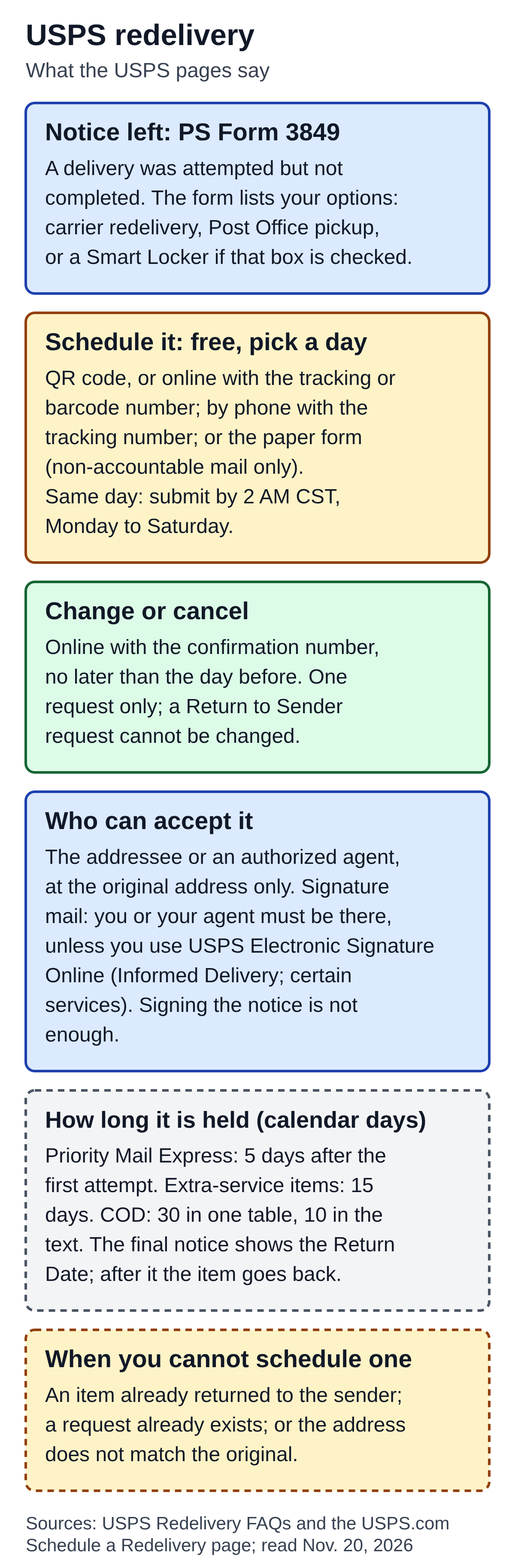
    USPS says that if a carrier could not complete a delivery and left a PS Form 3849 notice, you can schedule a free redelivery online, by phone or on the form itself, but you choose a day, not a time, and the item goes back to the sender after the return date unless you arrange a redelivery or pick it up. The notice is the starting point, and the dates on it matter more than the method you use.

    This article compares four USPS sources: the USPS FAQ “Redelivery – The Basics” (Article 000005320, dated September 16, 2026), the FAQ “What are the Second and Final Notice and Return Dates for Redelivery?” (Article 000006169, dated April 7, 2026), the FAQ “PS Form 3849 Redelivery Notice” (Article 000006180, dated June 29, 2026) and the USPS.com page “Schedule a Redelivery” (no update date shown). The wording is as of November 20, 2026. The sources overlap but do not always agree, and the article shows where they differ instead of choosing one. It gives no prices or fees. It does not cover delivery to a USPS Smart Locker beyond what the notice says, international or customs items, perishable parcels, or the USPS Delivery Instructions service itself.

    Diagram of what USPS pages say about redelivery. Notice left, PS Form 3849: a delivery was attempted but not completed; the form lists carrier redelivery, Post Office pickup, or a Smart Locker if that box is checked. Schedule it, free, for a day rather than a time: with the QR code or online using the tracking or barcode number, by phone with the tracking number, or on the paper form for non-accountable mail only; for same-day redelivery, submit by 2 AM CST, Monday to Saturday. Change or cancel online with the confirmation number no later than the day before; only one request is allowed and a Return to Sender request cannot be changed. Who can accept: the addressee or an authorized agent, at the original address only; for signature mail, you or your agent must be there unless you use USPS Electronic Signature Online, which Informed Delivery subscribers can use for certain services; signing the notice is not enough. How long it is held, in calendar days: Priority Mail Express 5 days after the first attempt; extra-service items 15 days; Collect on Delivery 30 days in one USPS table and 10 days in the text; the final notice shows the Return Date. Cannot schedule: an item already returned to the sender, an existing request, or an address that does not match the original. Sources: USPS FAQs 000005320, 000006169 and 000006180 and the USPS.com Schedule a Redelivery page, read Nov. 20, 2026.

    What the notice is and when you get one

    USPS calls the form PS Form 3849, “We ReDeliver for You!” The FAQ says it is left when a delivery was attempted but not completed, and it lists the reasons: the mail receptacle (mailbox, cluster box, parcel locker and so on) was full; no parcel locker was available; the item was too large for the receptacle; a signature, postage or fees were required; or the item could not be left in a secure place. The notice tells you what kind of mailpiece was attempted, why it was not left, and which options you have: a carrier redelivery, pickup at the Post Office, or, if the “Smart Locker Eligible” box is checked, a USPS Smart Locker. A yellow version, PS Form 3849-SD, is used when the attempt was made on a Sunday; the FAQ says the item is then available at the Post Office on the next business day (excluding holidays) or can be scheduled for redelivery with the QR code on the form.

    Redelivery happens after the first attempt. The FAQ separates it from USPS Delivery Instructions, which lets you set delivery options before an item has been attempted. Our tracking status article explains the tracking statuses that go with these notices; this article covers the scheduling rules.

    How to schedule a redelivery

    WayWhat you needWhat the pages say
    QR code on the formA phone that can scan itThe FAQ calls it the quickest way to choose your options; the code opens the redelivery page
    OnlineThe tracking number or the barcode number on the noticeThe USPS.com page says redeliveries can be scheduled 24 hours a day, 7 days a week, and that the address must match the original delivery address. In USPS Tracking, the redelivery option appears under “Available Actions” only if the item is eligible
    By phoneThe tracking number from the noticeOnly three options are available by phone: carrier redelivery, customer pickup and return to sender. A Smart Locker is not available by phone. Without a tracking number, the representative can only notify your Post Office
    On the paper formThe notice itselfNon-accountable mail only: fill in the back, pick a day at least 2 delivery days ahead, say where the item may be left, sign, and put the form in your mailbox. Not available for Restricted Delivery or Adult Signature items, on the Sunday form, or for items eligible for a Smart Locker
    At the Post OfficeThe notice and a valid photo IDPicking the item up no later than the day before a scheduled redelivery cancels that redelivery

    You do not need the paper notice if you have a tracking number or barcode number; the FAQ points to a separate page on finding it. It also says that if you have signed up for Informed Delivery, you can manage redeliveries there. Our Informed Delivery article says it does not cover redelivery.

    The FAQ says redelivery is available in many, but not all, areas. On the USPS.com page you enter your name, address, phone number and email address and select “Check Availability” before you schedule.

    Cutoffs, dates and changes

    You pick the day, not the time: the FAQ says items are delivered on the requested date but you may not request a specific time. For same-day redelivery, both the FAQ and the USPS.com page say to submit the request by 2 AM CST, Monday through Saturday; the page adds that otherwise the redelivery is scheduled for the next day.

    The requested date can be up to the day the item is scheduled to go back to the sender. On a final notice, that is the “Return Date” under “About the missed delivery.” The same FAQ then adds that scheduling must be done with advance notice and not on the date the item will be returned (see “Where the pages differ” below).

    To change or cancel an online request, the FAQ says to do it no later than the day before the scheduled redelivery, using the link in the confirmation email (“Edit this request”), the “Edit an existing redelivery request” option on the Redelivery page, or the Activity History in your USPS.com account. You need the confirmation number the page and the email give you. To switch to pickup, change “Carrier Redelivers” to “Customer will pick up.”

    The FAQ’s list of error messages adds three limits. There is a maximum of one redelivery request; if one exists, you edit it instead of making a second. A Return to Sender request cannot be canceled or modified once submitted. And a request session that has expired has to be restarted. If bad weather affects a scheduled redelivery, the FAQ says the item will be redelivered the next business day. If an attempt on the last day before the return date fails, the item is returned to the sender. If a scheduled redelivery did not happen, the FAQ says a service request may be sent by email to your local Post Office for follow-up.

    Who can accept it

    The FAQ says a residential redelivery goes to the addressee or the addressee’s agent, and that the item can be redelivered only to the original address on the mailpiece. An agent is a person you authorize either on PS Form 3801 (Standing Delivery Order) or in a letter to the postmaster; at the Post Office, the agent needs acceptable identification. The FAQ adds that the carrier is not required to check whether a person accepting a package at the home or business is truly the authorized agent. For a pickup, you can also name someone on the notice itself by signing the form and writing the person’s name; that option is not available for Registered Mail or Restricted Delivery.

    For accountable mail (items that require a signature or the payment of fees), the PS Form 3849 FAQ answers “Do I have to be present to sign for my mailpiece?” with “Maybe.” If you are an Informed Delivery subscriber, you can sign up for USPS Electronic Signature Online, which lets you sign electronically for domestic Priority Mail Express items, Signature Confirmation items and insured items over a stated value. Otherwise, the FAQ says you or an authorized agent must be present to sign for accountable mail delivered by a carrier. Both FAQs say that signing the notice and leaving it for the carrier does not meet the minimum requirements for redelivery. For businesses, an individual employee must sign; the business itself cannot, and the carrier must be able to enter the signer’s first initial and last name. Our Certified Mail article covers who signs for that service.

    What gets a notice, and how long items are held

    The FAQ says accountable mail needs a signature or a payment, so those items get a redelivery notice: Adult Signature, Collect on Delivery (COD), Registered Mail, Certified Mail, Signature Confirmation, Restricted Delivery, Return Receipt, domestic Priority Mail Express (the FAQ adds “unless signature waiver is not required,” wording it does not explain), and insured mail above a value the FAQ states. Non-accountable mail, such as uninsured packages, USPS Tracking items and perishable items, can be left when the carrier believes it can be left securely.

    The “Second and Final Notice” FAQ gives the schedule for items with extra services. The return date counts calendar days unless the FAQ says otherwise, and if it falls on a day that is not a Postal business day, the item goes back on the next Postal business day.

    Mail typeSecond or final noticeHeld after the first attempt
    Priority Mail Express3 days after receipt of the first notice5 days
    Certified Mail, Insured Mail, domestic Registered Mail, Signature Confirmation, Adult Signature Required, Return Receipt for Merchandise, USPS Tracking5 days after receipt of the first notice15 days
    Collect on Delivery (COD)5 days after receipt of the first notice30 days in the table (10 days in the text; see below)
    Postage Due5 days after receipt of the first notice15 days

    Carriers leave two notices, a first and a final, whether or not you schedule a redelivery. If you schedule after the first notice and are not home, the carrier leaves the final one; if you schedule after the final notice and are not home, no further notice is left. The “Final Notice” box is checked on the peach form, and the carrier does not have the item with them when that notice is left. The item stays available at the Post Office until close of business on the return date and goes back to the sender at close of business.

    For an ordinary parcel with no extra services, the first FAQ describes a different pattern. When someone is normally available to receive parcels, a second attempt is made the next working day and no notice is left on the first attempt; a notice is left after the second. If the carrier knows nobody is usually available, or does not know, the notice is left after the first attempt, and further attempts are made only at your request. For Priority Mail Express, the FAQ says there are no automatic attempts after the first; a second notice is left on the third calendar day, and the item is returned if you have not picked it up or scheduled a redelivery by close of business five calendar days after the first attempt. For signature mail, the second notice comes five days after the first, and the item is held for a number of days based on the service, usually 15.

    When you cannot schedule one

    Only items with certain tracking events can be redelivered, according to the FAQ: Available for Redelivery or Pickup, Notice Left, Receptacle Blocked, Receptacle Full / Item Oversized, No Secure Location Available, No Authorized Recipient Available, and Reminder to Schedule Redelivery. “Available for Pickup” appears in the same list with the note “(Customer Pickup and Returned to Sender Only).” The FAQ gives these reasons you may be unable to schedule: the address you enter does not match the original delivery address, a request already exists, or the package was returned to the sender. Its list of error messages also shows the statuses Refused (by recipient), Delivered and Out for Redelivery right after the reasons a package is not eligible, without explaining them, and one message says a package has exceeded the allowed number of redelivery attempts and should be picked up before the Return to Sender date. Once a redelivery is set, the tracking events are “Prepared for Redelivery” and “Out for Redelivery.”

    Where the pages differ

    • Scheduling on the return date. The “Redelivery – The Basics” FAQ says the requested date can be “up to” the day the item is scheduled for return, and in the next breath says scheduling must not be done on that date. The FAQ does not say which day is the last one that can be booked, and this article does not decide it.
    • How long COD is held. The Second and Final Notice FAQ says in its text that COD is held for 10 days (unless the mailer sets fewer, or it includes Hold For Pickup), and in its table lists 30 days. It also says accountable mail is returned after 15 days. The page does not explain the difference.
    • The change deadline. The FAQ says to modify or cancel no later than the day before the scheduled redelivery. One of its error messages refers to a 2 AM CST cutoff for changes. The FAQ does not say how the two fit together.
    • A second attempt. The FAQ says an ordinary parcel gets a second attempt the next working day, and that signature mail does not get an automatic one. Our tracking status article reports the tracking guide saying there is no automatic second attempt after the two “Notice Left” statuses. These describe different situations: one before a notice is left, the other after.

    What the pages do not say

    The pages give no list of the places where redelivery is available, and they do not say how long the service request email to the Post Office takes to be answered. The tracking status guide, as our tracking status article reports, gives no time limit for claiming an item; the “Second and Final Notice” table is where these pages give return dates, and it covers items with extra services, Priority Mail Express, postage due and a few other types. This article gives no fee or price.

    Sources

    The pages were checked on November 20, 2026.

  • USPS Refunds: What Can Be Refunded, When to Ask and What You Need

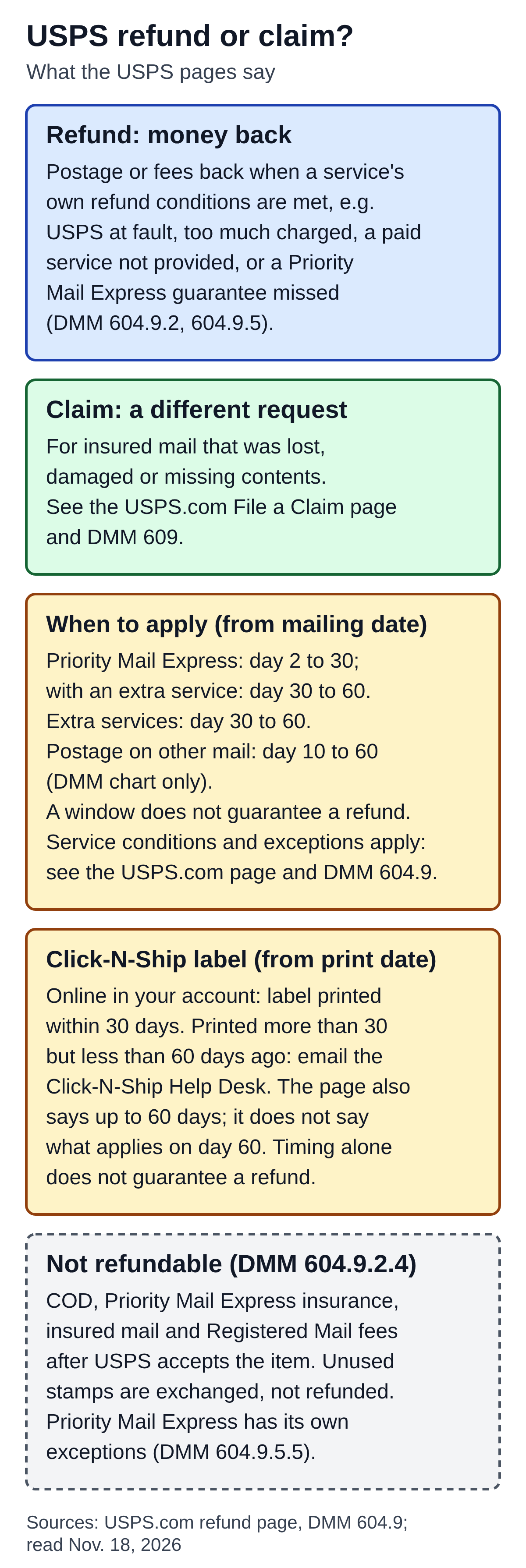
    USPS pages describe a refund as money back for postage or fees when a service’s own refund conditions are met, for example when USPS is at fault, when more than the lawful price was charged, when a paid service was not provided, or when Priority Mail Express did not arrive by its guaranteed time. The Domestic Mail Manual (DMM) sets application windows that run from 2 to 60 days after the mailing date, depending on the service, but a window does not by itself make a request eligible or approved. A claim for an insured item that was lost or damaged is a different request with its own rules.

    This article compares three USPS sources: the USPS.com page “Request a USPS Refund: Domestic” (no update date shown), section 604.9 of the DMM on exchanges and refunds (no date), and the USPS FAQ “Domestic Refunds – The Basics” (Article 000005310, dated September 26, 2024), which only points readers to the USPS.com page. The wording is as of November 18, 2026. The sources overlap but are not identical, and the article shows where they differ instead of choosing one. It gives no prices, fees or refund percentages. It does not cover international refunds, business bulk refunds, postage meters and PC Postage in detail, Every Door Direct Mail, Premium Forwarding Service Residential or Postal Store returns.

    Diagram of what USPS pages say about a refund and how it differs from a claim, with no amounts or fees. Refund: money back for postage or fees when a service's own refund conditions are met, such as USPS at fault, too much charged, a paid service not provided, or a Priority Mail Express guarantee missed (DMM 604.9.2, 604.9.5). Claim: for insured mail that was lost, damaged or missing contents, a separate process on the USPS.com File a Claim page and in DMM 609. When to apply, counted from the mailing date: Priority Mail Express day 2 to 30, or day 30 to 60 with an extra service; extra services day 30 to 60; postage on other mail day 10 to 60 (DMM chart only). A window does not guarantee a refund; service conditions and exceptions apply (USPS.com refund page, DMM 604.9). Click-N-Ship label, counted from the print date: online in your account for a label printed within 30 days; for a label printed more than 30 but less than 60 days ago, email the Click-N-Ship Help Desk. The page also says up to 60 days and does not say what applies on day 60; timing alone does not guarantee a refund. Not refundable (DMM 604.9.2.4): COD, Priority Mail Express insurance, insured mail and Registered Mail fees after USPS accepts the item; unused stamps are exchanged. Priority Mail Express has its own exceptions (DMM 604.9.5.5). Sources: USPS.com refund page, DMM 604.9; read Nov. 18, 2026.

    Refund or claim?

    The two requests are easy to confuse because both can follow a lost package. The USPS.com refund page says that to file a claim for insured mail that was lost, damaged or missing contents, you should go to the File a Claim page. DMM 604.9.2 starts the same way: a customer may apply for a refund of postage and fees, and for an indemnity claim for loss or damage it points to section 609.

    RefundClaim
    What it isMoney back for postage or fees when a service’s own refund conditions are met, such as USPS at fault, too much charged, a paid service not provided, or a Priority Mail Express guarantee missed (DMM 604.9.2 and 604.9.5; USPS.com)For insured mail that was lost, damaged or missing contents (USPS.com claims page; DMM 609)
    Where the rules areUSPS.com refund page; DMM 604.9USPS.com File a Claim page; DMM 609
    WindowsSet by service; a window is a time limit for applying, not a guarantee; see the table belowTheir own filing periods; see our USPS claims article

    The USPS claims FAQ, as our claims article reports, says postage reimbursement is included with the claim payment if the item was lost or not delivered, and that insurance fees “are not reimbursed.” The DMM’s list of cases with no refund includes the fees for insured mail, COD, Priority Mail Express insurance and Registered Mail once USPS has accepted the article. A Missing Mail search is neither a refund nor a claim; our Missing Mail article covers it.

    When to apply, by service

    The DMM chart (Exhibit 9.2.1) gives the windows below, counted from the mailing date. The USPS.com page repeats some of them and adds service-by-service steps. A window is only the period in which a request may be made. It does not mean the request is eligible or will be approved: each service has its own conditions and exceptions, which are set out on the USPS.com refund page and in DMM 604.9 (section 604.9.2 for postage and extra services, 604.9.5 for Priority Mail Express), and the main exceptions are summarized under “What is not refundable” below.

    ServiceWhat USPS says about timing (a window, not a guarantee)How to apply
    Priority Mail Express, no extra service2 to 30 days after mailing (DMM chart and USPS.com); eligibility depends on the guaranteed arrival time on your receipt and the DMM 604.9.5 exceptionsOnline with a free USPS.com account, or at a Post Office with PS Form 3533
    Priority Mail Express with an extra service30 to 60 days after mailing; one combined requestSame
    Extra services such as Certified Mail, Return Receipt, Signature Confirmation30 to 60 days after mailing (DMM chart and USPS.com)Online for some; otherwise where you paid
    Postage on other mail when no service was rendered10 to 60 days after mailing (DMM chart only; the USPS.com page does not list this row)PS Form 3533 at a Post Office (DMM 604.9.2.5)
    Unused Click-N-Ship labelCounted from the print date; the online route also needs an unscanned label with no earlier refund request; see the next sectionYour Click-N-Ship account, or email the Help Desk
    PO Box feesUSPS.com: new unused box, within 30 days of payment; box in use, pro-ratedOnline for a new box; the Post Office where the box is, for a box in use
    Package Intercept, Pickup On DemandNo window given on the pageOnline request

    Our Certified Mail article, PO Box article, Package Intercept article and Package Pickup article cover each of those services in more detail.

    For Pickup On Demand, the page says you are eligible only if the carrier fails to show up during the specified day, and not if the carrier shows up or if you cancel after 5 a.m. local time on the pickup day. For Priority Mail Express, the page says the service comes with a money-back guarantee, that postage is eligible for mail that did not arrive by the guaranteed arrival time shown on your receipt, that each tracking number can be used for only one refund request, and that refunds for the service and related extra services must be combined in a single request. DMM 604.9.5.1 says that, unless a situation in 604.9.5.5 delayed the item, USPS refunds the postage and any Sunday or holiday premium fee for an item that was not delivered, for which delivery was not attempted, or that was not made available for claim by the delivery date and time specified at mailing.

    Click-N-Ship labels: what the 30 and the 60 days mean

    The USPS.com page says unused Click-N-Ship labels are eligible for refunds up to 60 days after the print date, which it also calls the label transaction date. It then gives two routes. In your Click-N-Ship account you open Shipping History, check the labels, choose Refund Labels and proceed. The page lists three conditions for this route: the label has not been scanned by the postage system, it was created within the past 30 days of the label print date, and it does not already have a refund request. For a label printed more than 30 but less than 60 days ago, the page says to email the Click-N-Ship Help Desk with your username, Click-N-Ship account number, label number, and transaction number and date.

    So on the USPS.com page, the 30 days belong to the online route in your account and the 60 days to the older-label route by email, and both are counted from the print date, not the mailing date. The page’s own wording leaves a small gap: “up to 60 days” can include day 60, while the email route says “less than 60 days.” The page does not say what applies on day 60, and this article does not either. Timing alone does not make a label eligible: the online route also requires that the label has not been scanned and has no earlier refund request.

    DMM 604.9 does not name Click-N-Ship in any rule on label refunds; its only mention is a Sunday-fee refund for USPS Connect Local that is applied automatically through Click-N-Ship. It does have 30-day and 60-day rules in 604.9.3.10 and 604.9.3.11, but they are for PC Postage indicia: with a package identification code, a request must be started within 30 days of printing and sent electronically to the PC Postage provider; without one, the labels must be sent physically to the provider within 60 days of the date in the indicia. The DMM does not say that Click-N-Ship is a PC Postage product, so this article does not apply those two rules to Click-N-Ship, and it does not say the two sets of numbers are the same rule. The 60-day figure for meter indicia (604.9.3.2) is a third, separate rule.

    What to bring

    The USPS.com page says you will need proof of purchase and that you may need some or all of: the tracking number, the purchase receipt and a photo ID if you apply in person. For extra services and Priority Mail Express it lists the tracking number and the mailing receipt, and for an in-person Priority Mail Express request it says to fill in Part I of PS Form 3533 in duplicate and bring the original customer copy of Label 11.

    The DMM adds rules about evidence. For an online request, the mailer must keep the evidence of the services purchased until the request is resolved, and may be asked to upload it as a .jpeg, .pdf or .png file and give the mailing date. For PS Form 3533, the mailer submits the envelope or wrapper (or a part of it) showing the sender and addressee names and addresses, canceled postage and postal markings, or other evidence of postage and fees paid. The DMM also says no refund is made for postage, or for fees for extra services not rendered, when a postmarked mailing receipt, a retail Post Office mailing receipt or valid USPS acceptance or mail processing scan events are not available.

    What is not refundable

    Being inside a window does not make a request eligible, and these exceptions apply even then. DMM 604.9.2.4 lists cases with no refund. They include COD, Priority Mail Express insurance, insured mail and Registered Mail fees after USPS accepts the article, even if the article is later withdrawn; unused adhesive stamps, which may be exchanged instead; undeliverable Certified Mail and Signature Confirmation fees when a scan shows an attempted delivery; and the Package Intercept per-piece fee once USPS successfully intercepts the mailpiece.

    DMM 604.9.5.5 lists cases where Priority Mail Express postage is not refunded, including a delay caused by a strike or work stoppage, an item that is undeliverable as addressed, a shipment held at the addressee’s written request, and a 1-Day shipment mailed December 22 through December 25 that was delivered or attempted within two business days. For items to or from Alaska, Hawaii and some territories, it says postage is not refunded when the request is for something other than loss. Our holiday shipping deadlines article shows how two USPS pages footnote the Priority Mail Express guarantee for the holiday season.

    How a refund is paid and what if it is denied

    The USPS.com page says approved online refunds receive a check by mail, approved refunds requested at the Post Office are paid in cash, check or money order, approved Click-N-Ship refunds are credited to the original payment account, and business customers who applied online are refunded by check. The DMM adds that for requests on PS Form 3533, USPS may refund the postage immediately, in cash or with a no-fee money order, when it can tell right away that the mailer is entitled to it and the item has postage affixed (up to a limit the DMM states, not repeated here), and otherwise researches the request and pays by check or credit to an account.

    If a refund is partly paid or denied, USPS.com says you may file a dispute within 30 days of receiving the decision. DMM 604.9.2.5 says appeals of denied online requests must be made online within 30 days of receipt of the denial; for PS Form 3533, it says adverse rulings may be appealed through the postmaster to a USPS manager and gives no number of days. So for refunds both sources count from receipt. For the claims appeal, our claims article shows that the sources count the 30 days from different points.

    Where the sources differ

    • Extra-service windows. The DMM chart and the USPS.com page count the 30 to 60 days from the mailing date. DMM 604.9.2.4 lists no refund for extra-service fees when the request is made less than 30 or more than 60 days from the date the service was purchased. The pages do not say how the two dates fit together.
    • PO Box refunds. USPS.com says that for a box in use you can request a pro-rated refund for unused time at the Post Office where the box is, and that for a new box applied for online you can request a refund online within 30 days of the original payment. The USPS FAQ “PO Box – The Basics” (Article 000005315, dated November 13, 2026) instead sets refunds by rental term and month, says a 3-month box is not eligible once activated, and says a box never activated gets an automatic full refund after 30 days of inactivity. The DMM sends PO Box fee refunds to a different section (508.4.6), which this article did not read.
    • Package Intercept. The USPS.com page says the Package Intercept fee, plus any applicable postage charge, may be refundable if the shipment was not intercepted. The DMM says the per-piece fee is not refunded once USPS successfully intercepts the mailpiece. What is charged when an item is not intercepted is covered in our Package Intercept article, and this article does not reconcile the wording.
    • Postage on other mail. The 10-to-60-day row appears only in the DMM chart; the USPS.com page does not list it, so the page alone does not tell a customer who sent an ordinary letter or package when to apply.
    • The FAQ. The refund FAQ is a short pointer to the USPS.com page and is dated September 26, 2024, so it adds no rule of its own.

    What the pages do not say

    For the services covered here, the USPS.com page gives a processing time only for Package Intercept and Pickup On Demand: normally 2 to 3 business days, longer if USPS needs more information, with a credit that may take up to two billing cycles to appear on the card. It gives no processing time for Click-N-Ship, extra-service or Priority Mail Express refunds. This article gives no fee or refund amount for any service.

    Sources

    The pages were checked on November 18, 2026.

  • Is the Post Office Open on Thanksgiving? What USPS Says in 2026

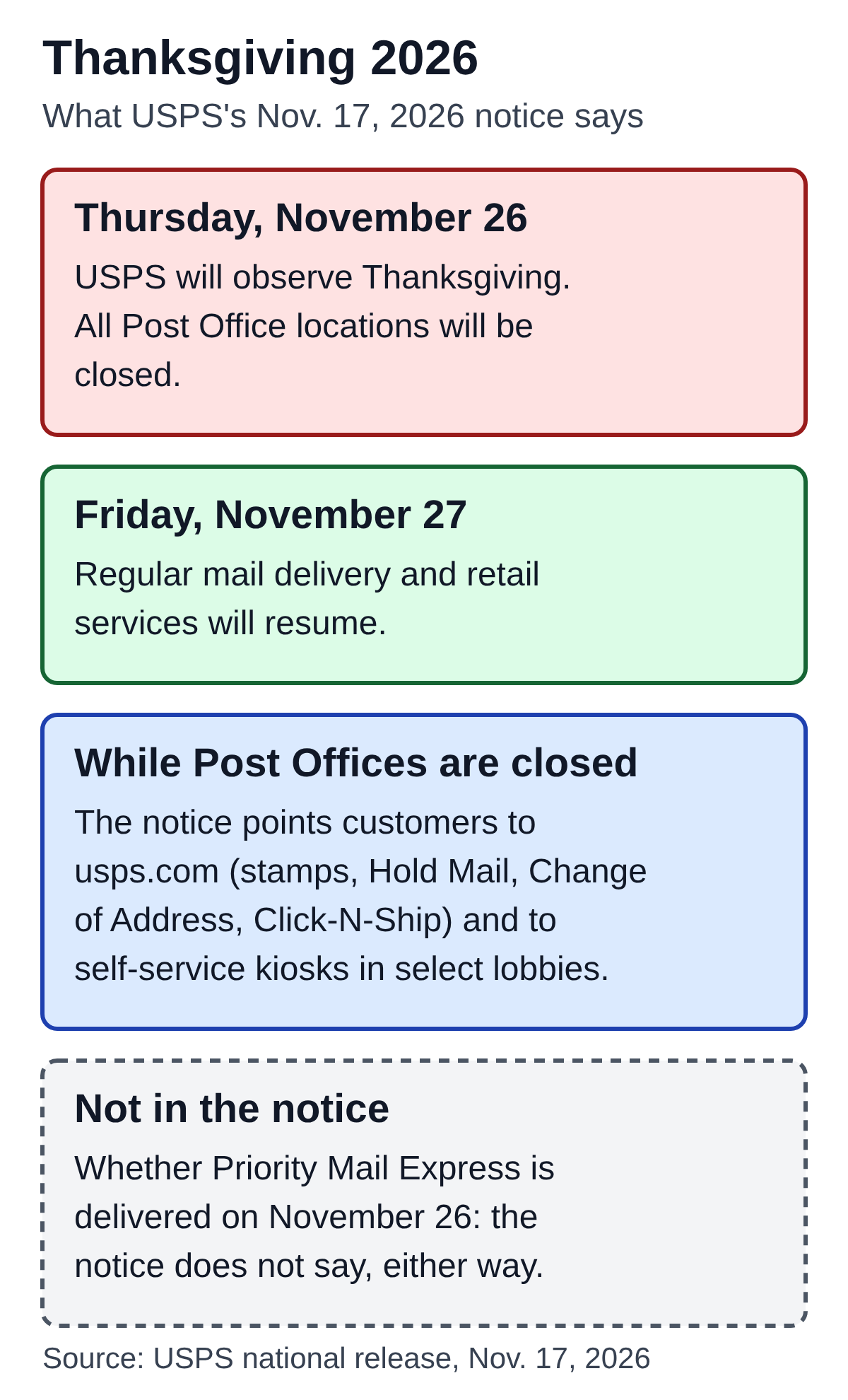
    USPS says it will observe the Thanksgiving federal holiday on Thursday, November 26, 2026, and that all Post Office locations will be closed. The notice adds that regular mail delivery and retail services will resume on Friday, November 27. Both statements come from a USPS national release dated November 17, 2026.

    This article covers only what that release says about November 26 and 27, 2026, and what it lists for customers while Post Offices are closed. The wording is as of November 18, 2026. It does not cover other carriers, local Post Office hours or other holidays, and it does not use USPS notices from earlier years.

    Diagram of what USPS's national release of November 17, 2026 says about Thanksgiving 2026. Thursday, November 26: USPS will observe Thanksgiving; all Post Office locations will be closed. Friday, November 27: regular mail delivery and retail services will resume. While Post Offices are closed: the notice points customers to usps.com (stamps, Hold Mail, Change of Address, Click-N-Ship) and to self-service kiosks in select lobbies. Not in the notice: whether Priority Mail Express is delivered on November 26; the notice does not say, either way. Source: USPS national release, Nov. 17, 2026.

    What the USPS notice says

    The release is titled “U.S. Postal Service To Observe Thanksgiving Holiday, Nov. 26” and is published in the USPS Newsroom. This is what it states about the holiday:

    DateWhat USPS says
    Thursday, November 26, 2026USPS will observe the Thanksgiving federal holiday. All Post Office locations will be closed.
    Friday, November 27, 2026Regular mail delivery and retail services will resume.

    USPS’s “Holidays & events” page also lists Thursday, November 26, 2026 as Thanksgiving Day. That page does not say whether Post Offices are open or closed, so the release is the source for the closure.

    What USPS lists while Post Offices are closed

    The release’s subtitle says that self-service options are available in many retail lobbies when Post Offices are closed. In the text, USPS reminds customers that on usps.com they can order stamps and free USPS boxes and use services such as Hold Mail, Change of Address, PO Box rental or renewal, and Click-N-Ship to print prepaid labels. Our Hold Mail article covers one of those services.

    The release also says self-service kiosks are available in select lobbies nationwide. It lists these kiosk features: postage printing for Priority Mail, Priority Mail Express and international shipping; stamps for purchase; weighing and mailing packages; and package tracking information. It says that as USPS modernizes its retail locations, more self-service options are becoming available at more locations and may include Rapid Dropoff Stations for customers who have already printed labels, printing a shipping label from a merchant-provided QR code, and USPS Smart Lockers for dropping off and picking up packages. It adds that many kiosks are available 24/7.

    The release does not name the lobbies that have kiosks, so it does not tell you whether a particular location has one.

    What the notice does not say

    The notice does not say whether Priority Mail Express will be delivered on November 26, either that it will or that it will not. The only place the release mentions Priority Mail Express is the kiosk list above, where it names the postage a kiosk can print. That is not a statement about delivery. This article does not fill the gap from other years or from other USPS notices, so on that question the notice gives no answer.

    The notice also does not list hours for any individual Post Office or lobby. Apart from the date on which regular mail delivery and retail services resume, it does not describe delivery on November 26, and it does not give mailing deadlines. USPS publishes its recommended holiday mailing dates separately; our holiday shipping deadlines article covers the Christmas dates.

    Sources

    The pages were checked on November 18, 2026.

  • USPS Claims: Filing Periods, Who Can File and What You Need

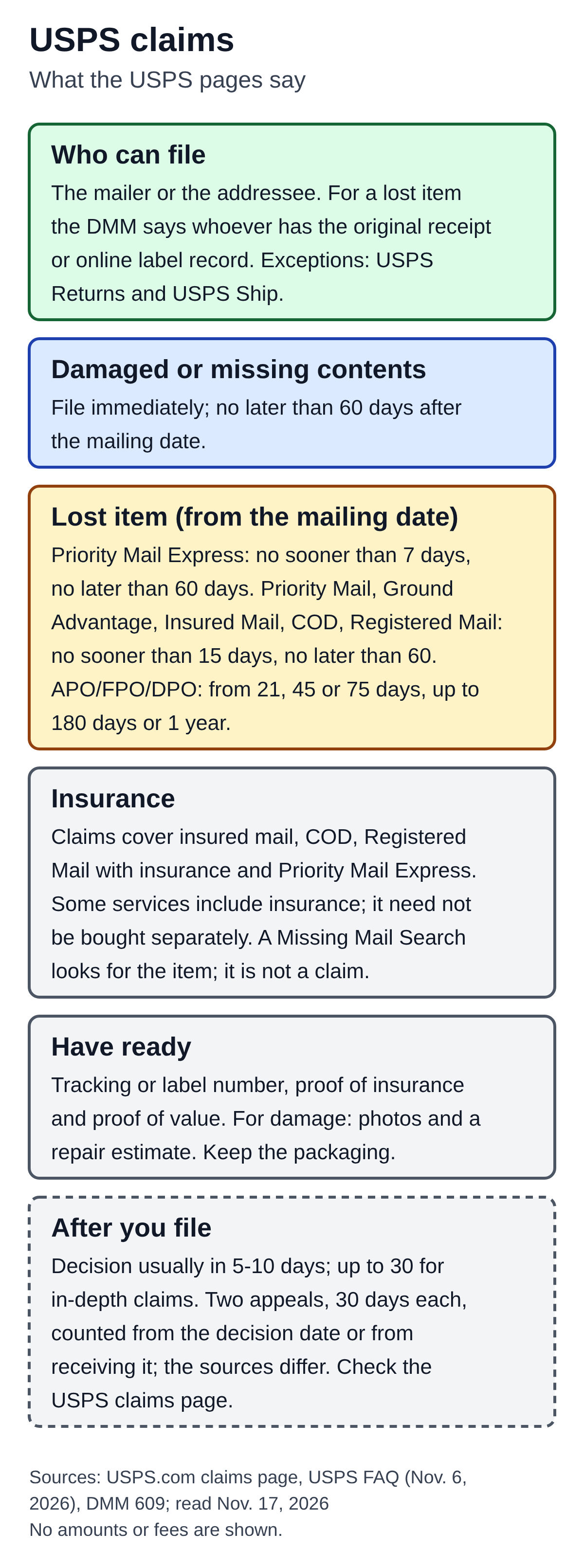
    USPS says a claim for damaged mail or missing contents can be filed immediately but no later than 60 days after the mailing date, and a claim for an item that never arrives has a window set by service. For Priority Mail and USPS Ground Advantage, USPS’s chart says to file no sooner than 15 days and no later than 60 days after mailing.

    This article compares what three official sources say about a domestic insurance claim: the USPS.com page “File a Claim” (no update date), the USPS FAQ “Domestic Claims – The Basics” (Article 000006089, dated November 6, 2026) and section 609 of the Domestic Mail Manual (DMM), “Filing Indemnity Claims for Loss or Damage” (no update date). It also uses one line from USPS.com’s “Shipping Insurance and Delivery Services” page. The wording is as of November 17, 2026. The sources overlap but are not identical, and the article shows where they differ instead of choosing one. It gives no prices, fees or payment limits. It does not cover international claims, bulk claims, or Priority Mail Express details. For a search for mail that has not arrived, see our Missing Mail article, which covers the search and points to USPS’s claims page.

    Diagram of what USPS pages say about filing a claim, with no amounts or fees. Who can file: the mailer or the addressee; for a lost item the Domestic Mail Manual says whoever has the original receipt or online label record; exceptions for USPS Returns and USPS Ship. Damaged or missing contents: file immediately and no later than 60 days after the mailing date. Lost item, counted from the mailing date: Priority Mail Express no sooner than 7 days and no later than 60 days; Priority Mail, Ground Advantage, Insured Mail, COD and Registered Mail no sooner than 15 days and no later than 60 days; APO, FPO and DPO mail from 21, 45 or 75 days, up to 180 days or 1 year. Insurance: claims cover insured mail, COD, Registered Mail with insurance and Priority Mail Express; some services include insurance, which need not be bought separately; a Missing Mail Search looks for the item and is not a claim. Have ready: tracking or label number, proof of insurance and proof of value; for damage, photos and a repair estimate; keep the packaging. After you file: a decision usually in 5 to 10 days and up to 30 for in-depth claims; two appeals of 30 days each, counted from the decision date or from receiving it, and the sources differ, so check the USPS claims page. Sources: the USPS.com claims page, the USPS FAQ dated Nov. 6, 2026 and Domestic Mail Manual section 609, read Nov. 17, 2026.

    Who can file

    USPS.com says: “Either the sender or the recipient may file a claim for insured mail that is lost, arrived damaged, or was missing contents. The person filing must have the original mailing receipt.” The FAQ says either the mailer or the addressee may file for a damaged or missing article. If the mailer files for a damaged article that is still with the recipient, the FAQ says the recipient must keep the article and its container until the claim is resolved. If both file, payment goes to the party who submits first and whose claim is approved.

    The DMM is more specific. For damaged articles or missing contents, either the mailer or the addressee may file. For lost articles, it says either one may file if they have “the original retail mailing receipt” or the online label record or computer printout. It also lists cases with a single eligible filer: only the account holder for insured USPS Returns packages, only the mailer when the mailer added and paid for insurance on USPS Returns packages, and only the mailer for insured or collect on delivery (COD) parcels paid using USPS Ship. The FAQ adds that claims without a mailing receipt can be filed, but payment may be limited; the DMM likewise says that if only the outer packaging is submitted as evidence of insurance, indemnity can be limited. Both give dollar limits by service, which this article does not repeat.

    When to file

    All three sources split the rule in two. For damaged mail or missing contents: file immediately, and no later than 60 days from the mailing date. USPS.com says the filing period “is based on the mailing date on your receipt.” For a lost item, USPS.com says: “file a claim in the time period for the service you used.” The chart on USPS.com and in the FAQ gives each service a “File After” (or “No Sooner Than”) day and a “File Before” (or “No Later Than”) day, counted from the mailing date.

    Service in the chartNo sooner thanNo later than
    Priority Mail Express7 days60 days
    Priority Mail Express COD15 days60 days
    Priority Mail15 days60 days
    USPS Ground Advantage15 days60 days
    Insured Mail15 days60 days
    Collect on Delivery (COD)15 days60 days
    Registered Mail and Registered COD15 days60 days
    APO/FPO Priority Mail Express Military Service21 days180 days
    APO/FPO/DPO Insured Mail and Registered Mail45 days1 year
    APO/FPO/DPO Insured Mail (surface only)75 days1 year

    The three sources do not match in every detail. The DMM chart lumps domestic Priority Mail into one row, “Insured Mail (including Priority Mail under 503.4.2),” and has no separate domestic Ground Advantage row; USPS.com and the FAQ list Priority Mail and USPS Ground Advantage as separate rows with the same numbers. The FAQ marks three rows with an asterisk: bulk claims submitted through the Business Customer Gateway should be filed no sooner than 15 days. USPS.com’s insurance page says, for Priority Mail and Ground Advantage, that when an item is lost you should file “no later than 60 days from the date of mailing,” and gives no opening day; the claims page gives the day 15 opening. The pages do not say why a lost-item claim cannot be filed sooner, or when an item counts as lost.

    Does the item need insurance?

    USPS.com says eligible items include Priority Mail Express items and other insured mail, COD items, and Registered Mail with insurance, and that “your insurance may have been included with the USPS service or purchased separately.” USPS.com’s insurance page says Priority Mail and USPS Ground Advantage include insurance (the page gives the amount) when the domestic shipment has an applicable USPS Tracking barcode; the tracking status article explains tracking statuses, and our Priority Mail vs. Ground Advantage article compares the two services. DMM section 503 says: “Except for Priority Mail pieces with included insurance, no insurance coverage is provided when purchasing Certified Mail.” Our Certified Mail article covers that service.

    Insurance does not have to be bought separately: as quoted above, it may have been included with the service. The claims the sources describe are for insured mail, COD items, Registered Mail with insurance and Priority Mail Express items (USPS.com’s list of eligible items and DMM 609.1.1), so the insurance requirement below applies to those; COD and Registered Mail rules are only touched on in this article. What the sources rule out is a claim for an item with no insurance at all. USPS.com says USPS “may not legally pay compensation for uninsured lost or damaged articles.” The FAQ says that “if insurance is not purchased at the time of mailing,” USPS “is unable to honor any requests to be compensated”; the same FAQ lists Priority Mail and USPS Ground Advantage as including insurance in the price of postage, and this article does not reconcile the two wordings. Your receipt or label record is what shows whether the package was insured (see below). A Missing Mail Search, which USPS.com offers for uninsured mail that is missing or delayed, is a search for the item and not a claim for payment.

    What to have ready

    USPS.com lists a tracking or label number (13 to 34 characters, found on your online label record, package label, mailing receipt or sales receipt), evidence of insurance, proof of value, and for damage, proof of damage. Evidence of insurance can be the original mailing receipt, the outer packaging showing the sender’s and addressee’s names and addresses and the proper insured label, or a printed electronic online label record. Proof of value can be a sales receipt, a paid invoice or bill of sale, a statement of value or repair estimate from a reputable dealer, a credit card statement, or a printout of an online transaction that shows the purchaser, seller, price, date, item and that the transaction is completed.

    Two points differ between sources. USPS.com says “the original mailing receipt” is needed; the DMM says that for insured and COD mail, a photocopy of the original mailing receipt is acceptable. And where USPS.com lists a printed online label record as evidence of insurance on its own, the DMM says that for a label bought online the printout must identify the tracking number, postage paid, insurance fee paid, declared value, mailing date, origin ZIP Code and delivery ZIP Code, and that a postmarked original mailing receipt or an electronic shipment acceptance scan followed by a valid acceptance or physical scan must also be available as evidence of mailing. For a mailed claim form with several extra services, the DMM says to provide original receipts for all of them.

    For damage, USPS.com asks for photos that clearly show the extent of damage and, for damaged claims, an estimate of repair costs from a reputable dealer. It says to save the original packaging and everything in it until the claim is settled, not to throw out damaged items even after photographing them, not to reship items that were not damaged, and that you may be asked to take the entire package to a Post Office for inspection. The FAQ and the DMM say that if the claim is for missing contents or damage, the addressee must keep the mailing container, damaged articles, packaging and contents, and that failure to make them available when USPS asks in writing “will result in denial of the claim.”

    How to file and what happens next

    USPS.com says online is the fastest and easiest way: log in or create a free USPS.com account, and you can save a claim to finish later. If you cannot file online, a paper Domestic Claim Form can be requested by phone. The FAQ says you can add up to 10 items to one online claim if they share a tracking number, that proof of value and proof of insurance are required, and that saved online claims “will be deleted after 3 days, if not submitted”; USPS.com gives no deletion period for saved claims.

    USPS.com says USPS usually sends claims decisions “within 5-10 days.” The FAQ gives the same range for most claims and adds that claims requiring in-depth processing, such as high claim amounts, can take up to 30 days. After approval, USPS.com says payment should arrive in 7-10 business days, and that USPS “does not pay a claim higher than an item’s actual value.” A claim can be paid in part or denied; the decision letter lists the reasons.

    For a partly paid or denied claim, there are two appeals, but the sources count the 30 days differently. USPS.com says you may file an appeal “within 30 days of receiving the decision,” and a second appeal “within 30 days of the date you received the appeal denial.” The FAQ says a first appeal is “within 30 days of the date of the original decision” and a final appeal to the Consumer Advocate is “within 30 days of the date of the second denial.” The DMM (section 609.6) says a customer may appeal “within 30 days from the date of the original decision,” and for the final review says only “within 30 days,” without saying from when. Whether “receiving” and “date of” mean the same day is not stated, and this article does not say which wording applies. Anyone close to a limit may want to count from the decision date and to check the current wording on the USPS claims page, which the DMM names for filing appeals.

    On refunds, the FAQ says postage reimbursement is included with the claim payment if the item was lost or not delivered, and that insurance fees “are not reimbursed.” USPS.com sends postage and fee refunds to a separate page, which this article did not read; our USPS refunds article covers that page and the refund rules in the Domestic Mail Manual.

    Cases that are limited or not paid

    The DMM’s list of nonpayable situations includes: evidence of insurance coverage not provided; loss or damage that occurred after delivery by USPS; a claim based solely on sentimental rather than actual value; perishable contents that froze, melted, spoiled or deteriorated; damage to articles not properly wrapped for protection; and an article so fragile it could not be carried safely in the mail regardless of packaging. The FAQ adds special cases. For airline tickets, you may only file for the cost of a Lost Ticket Report. Gift cards and similar items such as lottery tickets are not paid. Cash and negotiable items have their own, lower limit (Registered Mail is the exception), and checks are not treated as cash. Collectibles need a receipt, invoice or statement of value from a reputable dealer. The DMM section on claims has more cases than this article lists.

    What the sources do not say

    USPS.com says its instructions “do not include all the details and exceptions” in the DMM, so this article does not cover every case either. Neither USPS.com nor the DMM shows an update date. None of the sources says how many claims are approved, or when an item counts as lost. They give different pictures of the receipt requirement, as shown above. The FAQ points to DMM section 609 for more on payable claims; this article read section 609 and the one sentence of section 503 quoted above, not the other DMM sections it cites.

    Sources

  • Priority Mail vs. Ground Advantage: What USPS Pages Say

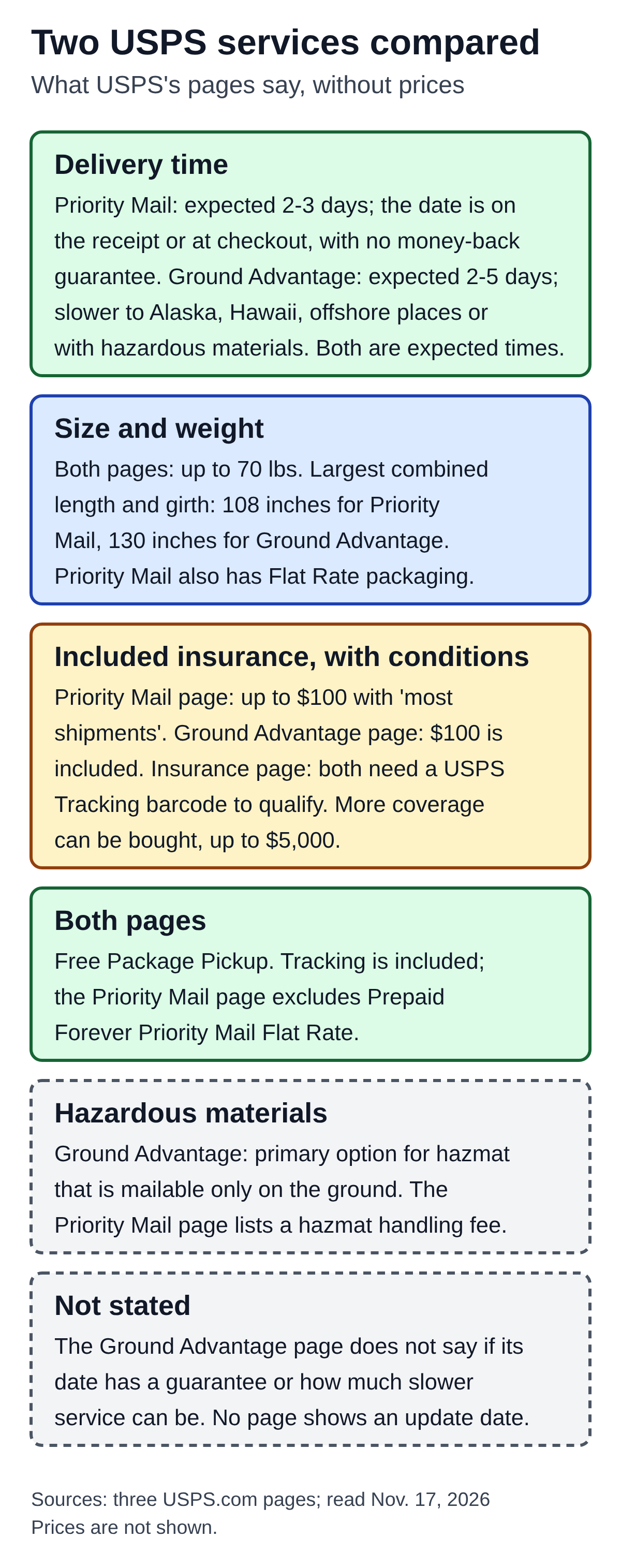
    USPS’s Priority Mail page gives an expected delivery of 2-3 days and its USPS Ground Advantage page an expected 2-5 days, and the two pages differ on size limits, included insurance and other conditions. The Priority Mail page says its expected delivery date “does not come with a money-back guarantee”; the Ground Advantage page does not say either way.

    This article compares three USPS.com pages as of November 17, 2026: “Priority Mail” (usps.com/ship/priority-mail.htm), “Ground Advantage” (usps.com/ship/ground-advantage.htm) and “Shipping Insurance and Delivery Services” (usps.com/ship/insurance-extra-services.htm). None of the three shows an update date, and this article did not find a USPS FAQ article for Ground Advantage. It gives no prices; all three pages show them. It does not cover Priority Mail Express, business and commercial options, international mail, or which service to pick. Where a fact appears on only one page, the article says so and does not assume the other service is the same.

    Diagram of what USPS pages say about Priority Mail and USPS Ground Advantage, without prices. Delivery time: Priority Mail expected 2-3 days, with the expected date on the receipt or at checkout and no money-back guarantee; Ground Advantage expected 2-5 days, with slower service possible for Alaska, Hawaii, offshore places or hazardous materials; both are expected times. Size and weight: both pages say up to 70 lbs; largest combined length and girth is 108 inches for Priority Mail and 130 inches for Ground Advantage; Priority Mail also has Flat Rate packaging. Included insurance, with conditions: the Priority Mail page says up to $100 with most shipments, the Ground Advantage page says $100 is included, and the insurance page says both need a USPS Tracking barcode to qualify; more coverage can be bought, up to $5,000. Both pages: Free Package Pickup and tracking included, and the Priority Mail page excludes Prepaid Forever Priority Mail Flat Rate from tracking. Hazardous materials: Ground Advantage is the primary option for hazmat that is mailable only on the ground; the Priority Mail page lists a hazmat handling fee. Not stated: whether the Ground Advantage date has a guarantee, how much slower service can be, and update dates. Sources: three USPS.com pages, read Nov. 17, 2026.

    Delivery time

    The Priority Mail page is headed “2-3 Days” and says the service “includes tracking and delivery in 2-3 days.” Its footnote says that “in most cases” the expected delivery date printed on your receipt or provided at checkout “will reflect a delivery time of 2-3 days and is based on origin, destination, and drop-off time,” and adds: “The expected delivery date does not come with a money-back guarantee.” The page also points to the USPS Service Standards Map for delivery time estimates.

    The Ground Advantage page is headed “Packages in 2–5 Days,” and its footnote reads “Expected delivery in 2–5 days.” The footnote then says that “packages going to certain places (including Alaska, Hawaii, and offshore destinations), or containing hazardous materials may receive slower service.” Both pages word the time as an expected delivery, so this article reads 2-3 and 2-5 days as USPS’s expected times, not as fixed delivery times. The Ground Advantage page does not say how much slower, and it does not say whether its expected delivery date comes with a money-back guarantee or not. It also does not say where the date is shown, or that it depends on drop-off time, as the Priority Mail footnote does. This article therefore does not say Ground Advantage has no guarantee; it says the page is silent on it.

    For December, see our article on the USPS 2026 holiday shipping deadlines, which covers USPS’s recommended send-by dates for both services.

    Size and weight

    Both pages give 70 lbs as the maximum weight. The largest combined length and girth (girth is the distance around the thickest part) is 108 inches on the Priority Mail page and 130 inches on the Ground Advantage page.

    Packaging differs. The Priority Mail page describes Flat Rate envelopes and boxes in standard sizes that “let you ship packages up to 70 lbs to any state at the same price,” or your own box priced by weight and zone. The Ground Advantage page says you need to use your own packaging and measure it, and prices by weight and zone: up to 15.999 oz in tiers of 4 oz, 8 oz, 12 oz and 15.999 oz, then by the pound, rounded up. It also says a large First-Class Mail envelope that is more than 15″ long, 12″ high or 3/4″ thick, rigid, or not uniformly thick pays the Ground Advantage price.

    Both pages describe dimensional weight the same way: for a package larger than 1 cubic foot (1,728 cubic inches), multiply length by width by height and divide by 139. Both also list extra fees for nonstandard packages and for live animals or perishable items such as food or plants. The two lists of nonstandard fees are not the same, and this article does not give them. The Priority Mail page adds that Flat Rate packaging is exempt from all nonstandard fees.

    Insurance and tracking

    The two pages word the insurance differently. The Priority Mail page lists “USPS Tracking and up to $100 of insurance with most shipments (restrictions apply).” The Ground Advantage page says “$100 insurance is included (for both outbound and return shipments),” and that you can buy up to $5,000 in additional coverage against loss or damage for merchandise.

    The conditions are on the Priority Mail page’s footnotes and on the insurance page. The Priority Mail footnote says insurance is “available only for certain products and to certain destinations,” that “insurance does not cover certain items,” and points to the Domestic Mail Manual: 609.4.3 (Non-payable Claims), 609 (Filing Indemnity Claims for Loss or Damage) and 503.4 (Insured Mail). It says Priority Mail domestic shipments must have the applicable USPS Tracking barcode to qualify; that insurance is not included for Priority Mail Open & Distribute, Premium Forwarding Service-Residential or Premium Forwarding Service-Commercial; and that when additional insurance is bought, “it replaces the included insurance.”

    The insurance page says that both Priority Mail and Ground Advantage domestic shipments “must have an applicable USPS Tracking barcode to qualify for included insurance,” and that Priority Mail insurance “is not included when you purchase it along with certain extra services.” Its footnote says the included coverage is limited to a maximum liability of $100 when the piece bears an Intelligent Mail package barcode or USPS retail tracking barcode “and the mailer pays retail or commercial prices.” The page does not name the extra services it means. Separately, section 503 of the Domestic Mail Manual says: “Except for Priority Mail pieces with included insurance, no insurance coverage is provided when purchasing Certified Mail.” Our Certified Mail article covers that service.

    Tracking is included in both. The Priority Mail page excludes Prepaid Forever Priority Mail Flat Rate products from tracking; none of the three pages says whether those packages get the included insurance, so the article does not say so either. For what tracking statuses mean, see our tracking status article. If a package does not arrive, USPS.com asks you to keep your postmarked mailing receipt and proof of value in case you need a claim; our Missing Mail article covers the search for lost mail, and our USPS claims article compares what USPS pages say about filing a claim.

    Pickup and other features

    Both pages list free Package Pickup at your home or office. Our Package Pickup article covers how it works and its limits, including that the FAQ lists both Priority Mail and USPS Ground Advantage as eligible.

    Some lines appear on one page only. The Priority Mail page says there are “no surcharges for fuel; residential or rural delivery; or Saturday delivery.” The footnote attached to the Saturday part mentions Priority Mail Express, so this article draws no conclusion from the Saturday wording. The Ground Advantage page says it “includes forwarding, undeliverable as addressed (UAA), and return to sender (RTS) at no additional cost”; the Priority Mail page has no such line. The Ground Advantage page calls it the “primary option” for hazardous materials that are only mailable by ground transportation, and says its HAZMAT handling fee is zero. The Priority Mail page lists a HAZMAT handling fee.

    The Ground Advantage page calls the service “our best-priced service for items up to 15.999 oz.” This article does not compare costs because it gives no prices; USPS.com has a Price Calculator for that.

    What the pages do not say

    None of the three pages shows an update date. The Ground Advantage page does not say whether its expected date has a guarantee, how much slower “slower service” can be, or whether the date depends on drop-off time. The Priority Mail page lists some exclusions in its footnotes but says restrictions and exclusions apply and points to the Domestic Mail Manual for the rest; this article read only the claims section of the manual (609) and the one sentence of section 503 quoted above, not 503.4 itself. Whether Prepaid Forever Priority Mail Flat Rate packages get the included insurance is not stated. Neither page says which service is better for a given package.

    Sources

  • USPS Passport Services: What the Post Office Does and Does Not Handle

    USPS says thousands of Post Offices accept first-time passport applications and most of those can also take passport photos, but “The Postal Service does NOT issue or create passports,” and USPS.com says that if you are eligible to renew by mail or online, you “cannot renew in person.” The passport itself comes from the U.S. Department of State.

    This article covers two USPS pages: the USPS.com page “Passports” (the page titled “Passport Appointments, Renewals, & Photo Services”; no update date shown) and the USPS FAQ “U.S. Passports – The Basics” (Article 000007488, dated November 5, 2026). The wording is as of November 13, 2026. The passport rules belong to the State Department. On Nov. 13, 2026 its pages on applying in person as an adult, renewing by mail and getting a passport faster were read in English. They are used here for the urgent travel section, for the in-person list and for the under-16 renewal rule; everything else below is what USPS says, not what the State Department says, and this article sends you to the State Department pages for the current rules and exceptions. The pages list fees; this article gives no prices. It does not cover passport cards beyond one line, lost or stolen passports, or international travel rules. It does not give current passport processing times: the timing it reports is limited to what the USPS pages say about expedited renewal, urgent travel and when processing starts, and what the State Department’s page on getting a passport faster lists for each service option. For the latest processing times, check the State Department.

    Diagram of what the USPS pages say about passport services. What passport Post Offices do: thousands of Post Offices accept first-time passport applications and most of those also take photos; the Postal Service reviews the application and forwards it to the State Department. What it does not do: does not issue passports or hand them out, because the State Department mails them; no renewals in person according to USPS.com; the FAQ points renewals, lost or stolen passports and name changes to the State Department. Apply in person if (FAQ list): first passport; child under 16; the last one issued under 16 or over 15 years ago, or lost, stolen or damaged; or a name change you cannot document. Renew by mail or online: USPS.com says if you can renew by mail or online, you must, and you cannot renew in person; expedited renewal service is by mail; for urgent travel the USPS.com and State Department numbers differ, so use the State Department page; a passport issued under 16 is not renewable. Appointments: USPS.com says book online, at a lobby kiosk or a retail counter, with limited walk-in hours at select locations; the FAQ adds booking by phone; renewals cannot be booked in the scheduler. After you apply: processing starts when the State Department gets the application; it mails the passport, sometimes apart from your documents. Sources: USPS.com passports page (no date), USPS FAQ (Nov. 5, 2026) and State Department pages, all read Nov. 13, 2026; for urgent travel, check the State Department page.

    What the Post Office does, and what it does not

    The FAQ states the Postal Service’s role in a short list. It applies to the Post Offices that offer passport services, not to every Post Office: USPS.com says “thousands” accept applications and “most of those locations” can also take the photo. The Postal Service will accept a customer’s first-time passport application, take authorized passport photos, and “review the application and forward the application to the U.S. Department of State for processing.” It then says the Postal Service does not issue or create passports, and that customers “CANNOT pick up passports from a Post Office™ facility; they are mailed to the customer from the U.S. Department of State.”

    For anyone who wants to renew a passport, replace a lost or stolen one, or provide a name change, the FAQ says to visit the State Department’s website. The FAQ also notes that private courier companies called “passport expeditors” may submit applications on behalf of customers, and it points to the State Department for details; it does not describe them further.

    USPS.com opens with a shorter version: “Thousands of Post Offices™ accept first-time passport applications for the U.S. Department of State,” and most of those locations can also take a passport photo, including digital photos for online renewals.

    Who applies in person

    The FAQ lists when you must apply in person using Form DS-11. It is enough if at least one of these is true: you are applying for your first U.S. passport; you are under age 16; your previous passport was issued when you were under 16; your previous passport was lost, stolen or damaged; your previous passport was issued more than 15 years ago; or your name has changed since the passport was issued and you cannot legally document the name change. It adds that if none of those apply, “you may be eligible to Renew by Mail using Form DS-82.” The State Department’s page on applying in person as an adult is the place to check the full eligibility rules and exceptions. Its list covers first-time adult applicants age 18 and older and adults whose passport was lost, stolen or damaged, issued over 15 years ago, or issued when they were under age 16; it does not list a name change, which the FAQ list includes. Its renew-by-mail page says you cannot renew a passport for a child under age 16.

    For minors, the FAQ says a child under 16 must apply in person with both parents or guardians, who must show their relationship to the child, present acceptable identification and give consent. A 16- or 17-year-old must appear in person and may need a parent or guardian to show photo ID and establish parental consent. USPS.com says “Passports for children under 16 have special requirements.” Separately, in its renewal text, it says a minor’s passport “cannot be ‘renewed’” and that each time it expires you submit a new first-time application in person. That sentence does not give an age. The page’s renew-by-mail conditions require a passport issued at age 16 or older, and the FAQ’s in-person list includes a previous passport issued under 16, so this article reads the sentence as covering passports issued to children under 16 and does not extend it further.

    The two pages word the age line a little differently. USPS.com’s first-time section says that if you “are 16 or under” you need to apply in person, while the FAQ says “under age 16” and then lists 16- and 17-year-olds separately as also having to appear in person. This article does not resolve that; it shows both wordings.

    Renewing: what USPS.com says

    USPS.com is firmer than the FAQ about renewals. It says: “You must renew by mail or online if you’re eligible; you cannot renew in person.” If you need expedited service for a renewal, USPS.com says you must renew by mail (its mail option is labelled “Available with Expedited Service”), and anyone not eligible to renew by mail must apply in person as a first-time applicant. The FAQ, by contrast, answers “How do I renew a passport?” by sending readers to the State Department’s website; its only eligibility line is the one above, that otherwise you “may be eligible to Renew by Mail.”

    USPS.com lists conditions for each route. To renew by mail, it says your adult passport must be in your possession, undamaged apart from normal wear, issued when you were 16 or older, issued within the last 15 years, and in your current name or with a documentable name change. To renew online, it adds conditions such as: the passport was valid for 10 years and expires within 1 year or expired less than 5 years ago, you are 25 or older, you are not changing information such as your name, you are not traveling for at least 6 weeks, and you have a mailing address in a U.S. state or territory (not an Army, Fleet or Diplomatic Post Office address). Online renewals need a digital photo, which USPS says many locations can take.

    For a mailed renewal, USPS.com says the State Department recommends a USPS delivery tracking service, and the FAQ names Priority Mail Express and Priority Mail.

    Expedited service and urgent travel

    USPS.com says that if you need expedited service for a renewal, you must renew by mail. For a life-or-death emergency or urgent travel it does not point to a Post Office; it points to the State Department, to its Life-or-Death Emergencies page and to a phone call to the State Department Passport Agency for an appointment.

    The State Department’s page on getting a passport faster (last updated Sep. 30, 2026 as displayed; read in English on Nov. 13, 2026) lists four options. Its numbers mean different things, so they are listed one by one:

    • Life-or-death, travel in less than 14 days. You may qualify for an emergency appointment if you need to travel abroad in the next 14 days because an immediate family member outside the United States has died, is dying or in hospice care, or has a life-threatening illness or injury.
    • Urgent, travel in less than 2 to 3 weeks. You make an appointment at a passport agency or center. The page says to do it when you are within 14 calendar days of your international travel date, or 28 days if you need a foreign visa. So 2 to 3 weeks is how soon you travel, and 14 or 28 days is how close to the travel date you book.
    • Expedited, travel in less than 6 weeks from the date you submit. Processing takes 2 to 3 weeks and does not include mailing, which may add 2 weeks. It is done at an acceptance facility or, for a renewal, by mail, for an extra fee.
    • Routine, travel in 6 weeks or more. Processing takes 4 to 6 weeks, plus mailing.

    The same page says you must make an appointment for urgent and emergency service and that appointment slots may not be available right away. It also says mail can add up to 2 weeks to the total time, and that you can pay for faster shipping. Its renew-by-mail page (last updated Oct. 1, 2026 as displayed) words the urgent cutoff as travel in less than 3 weeks, with an appointment within 14 calendar days of the travel date.

    USPS.com’s numbers are different. For a life-or-death emergency it says “within 72 hours (3 business days)” of travel, and its urgent travel heading is “Urgent Travel in Less than 10 Weeks”, with an appointment date “within 72 hours (3 business days)” of travel. These do not match the State Department’s 14 days, 2 to 3 weeks and 14 or 28 days above, so do not read them as the same booking rule. This article does not say why they differ or whether the USPS.com page is out of date. For urgent or emergency travel, check the State Department’s page on getting a passport faster before you book.

    Appointments and walk-ins

    For first-time passports, minors’ passports and photos, USPS.com says to schedule an in-person appointment online. Its Step 3 says Post Offices that offer passport services have set hours and that you “need to schedule an appointment” using the online Retail Customer Appointment Scheduler or a lobby self-service kiosk. A banner at the top of the same page is a little different: it lists the online scheduler, the kiosk “or at a Post Office retail counter,” and adds “We also offer limited Passport walk-in hours at select locations.” The page does not say which locations.

    The FAQ describes three ways to book: online, by phone through an automated system (up to six applicants), or at a Post Office self-service kiosk. It says “Passport renewals cannot be made using RCAS or on the kiosk,” and that USPS employees cannot create appointments online for customers.

    Photos and what to bring

    Both pages say many Post Offices can take the photo for a fee. The FAQ lists photo requirements (a plain white or off-white background, 2 x 2 inches, in color, taken within the last 6 months, and glasses removed) and credits them to a State Department page from 2017, so those requirements should be checked against the State Department’s current page. USPS.com says hard copy photos are for Renew by Mail and digital photos for Renew Online, and that a photo-only appointment can be scheduled.

    For a first-time application, USPS.com lists an unsigned application form, proof of identity and proof of U.S. citizenship, each with a photocopy of the front and back, and passport fees. It tells you to complete Form DS-11 on the State Department’s website, print it, and “DO NOT SIGN YOUR APPLICATION. A Postal employee must witness your signature.” The FAQ says USPS does not provide the forms, and it lists accepted primary and secondary IDs and notes that digital IDs (such as mobile driver’s licenses) are not accepted. (A passport is also one of the documents TSA accepts at airport checkpoints; see our REAL ID article.)

    Both pages say a first-time application involves two separate payments: a fee paid to the State Department and an acceptance fee paid to the Postal Service. Both say credit and debit cards cannot be used for the State Department payment. The pages differ on how to pay USPS: the FAQ lists cash, money orders, personal checks and cards, while USPS.com mentions a check, money order, debit card or credit card. No amounts are given here.

    After you apply

    The FAQ says processing times “begin the day the Department of State receives your application at a passport agency or center, not the day you mail your application or apply for a passport at a local acceptance facility.” It also says you may receive your new passport and your citizenship documents in two separate mailings, and to contact the National Passport Information Center if a second mailing does not arrive within 10 business days of the first.

    To follow an application, USPS.com points to the State Department’s Online Passport Status System and says you may not be able to get a status update for 2 weeks after you apply or renew.

    What the pages do not say

    Neither USPS page gives how long a routine passport takes or the current processing times; the FAQ says where processing starts and USPS.com points to the State Department for current processing times. USPS.com does give timing for expedited and urgent cases (see the expedited section above), and those numbers differ from the State Department page. For the latest processing times, check the State Department. USPS.com does not say which locations offer walk-in hours. The FAQ does not repeat the renewal rules that USPS.com gives, and USPS.com has no update date. This article compared the State Department pages only on the points named above (the in-person list, the under-16 renewal rule and the urgent travel timing); the photo requirements, payments and other rules were not compared.

    Sources

  • USPS Tracking Status: What Each One Means and What USPS Says to Do

    USPS’s status guide says an “Out for Delivery” scan means the package “will be delivered by a carrier today,” but USPS also says “USPS Tracking does not expedite or guarantee delivery.” The guide says that if the package has not arrived after 1 full postal business day has passed following that scan, you can use the tracking number to submit a service request to your local Post Office. Other statuses have other waits, and the guide does not use one rule for all of them.

    This article covers two USPS FAQ pages: “Where is my package? Tracking Status Help” (Article 000006077, dated September 29, 2026) and “USPS Tracking® – The Basics” (Article 000007991, dated September 17, 2026). The wording is as of November 13, 2026. The status guide lists 27 statuses in five groups; this article follows those groups and spends most of its space on the statuses where the guide tells you to do something. It gives no prices. It does not cover international tracking, claims and refunds, how a service request is handled, or other carriers.

    Diagram of what the USPS tracking status guide says. Before USPS has it: label created, shipping partner and pre-shipment statuses; the FAQ says USPS does not have the package yet, so contact the shipper. Moving through the network: In Transit, Arrived at USPS Facility and Departed USPS Facility can repeat, on the same or on different days; Forwarded means a change of address or the wrong Post Office. Out for delivery: the FAQ says a carrier delivers it today, maybe later in the day, and USPS says tracking does not guarantee delivery; no Delivered scan by 9 pm local time gives Delivery Status Not Updated, with delivery expected the next business day. Notice left, pickup or hold: Notice Left has no automatic second attempt, and the options are to schedule a redelivery, pick it up or ask for return to the sender; for Available for Pickup and Held at Post Office, At Customer Request a redelivery cannot be scheduled. Marked delivered but not found: check the garage, household, mailbox, porch, covered spots, doors, a parcel locker (key in the mailbox) or the building office. When the FAQ says to ask USPS: Out for Delivery, Arrived at Post Office, Delivery Status Not Updated and Delivered after 1 full postal business day; No Access to Delivery Location after 24 hours; use the tracking number to submit a service request. Sources: two USPS FAQs dated Sept. 29 and Sept. 17, 2026, read Nov. 13, 2026.

    What USPS Tracking does and does not promise

    The “Basics” FAQ is plain about the limits. It says “USPS Tracking does not expedite or guarantee delivery.” Tracking can start as soon as the sender or a shipping partner tells USPS electronically to expect a package, continues when USPS accepts it, and ends when the item is delivered or picked up. The FAQ says scanning information “is updated throughout the day as scans become available,” and it points to the Scan Event Status page for what a specific status means.

    Two more points from the same FAQ. First, First-Class Mail postcards, letters and flats “are not eligible for USPS Tracking service,” although letters and flats can get extra services such as Certified Mail or Registered Mail that carry barcodes (our Certified Mail article covers one of them). Second, you may see an Expected Delivery Window, which the FAQ describes as “a 2-hour slot of time when you can expect your package to arrive,” and adds that “Delivery within that time is not guaranteed.” If the status is “Alert,” the FAQ says to check USPS Service Alerts first, because weather and other events can cause delays.

    The FAQ also says the absence of a delivery scan “does not necessarily indicate that the item was not delivered”: the piece may have been delivered without the scan being captured, and it suggests contacting the sender or recipient to confirm.

    Before USPS has the package

    The first group in the status guide, “Acceptance / Preshipment,” covers statuses that come before USPS handles the package. For the statuses that mention a shipping partner (picked up by, arrived at or departed a shipping partner facility, “USPS Awaiting Item,” and “On its Way to USPS”), the guide says “USPS does not have possession of the package” and tells you to contact the shipper with questions. “Shipping Label Created, USPS Awaiting Item” and “Pre-Shipment, USPS Awaiting Item” mean a shipping label has been created with a USPS Tracking number and “The package has not yet been given to USPS.” The advice is again to contact the shipper.

    Two statuses in that group describe USPS handling. “USPS In Possession of Item” means USPS has received or picked up the package and will begin processing it, and the guide says no action is needed. “Shipment Received, Package Acceptance Pending” means a postal facility has received a container or pallet of many packages but has not started processing, and each package will get its own acceptance scan once the container is opened.

    Moving through the network

    For “In Transit,” “Arrived at USPS Facility” and “Departed USPS Facility,” the guide says the package “is currently being processed or transported to your delivering Post Office.” It adds that these scans “may appear multiple times from the same facility and/or on different days as it is traveling,” so a repeat is not described as a problem. The guide gives no number of days for this stage.

    “Forwarded” and “Forward Processed” mean the package is being forwarded to a different address, which the guide says is “due to a change of address request or because the package is at the wrong Post Office for delivery.” (Our mail forwarding article covers change-of-address forwarding.)

    “Arrived at Post Office” is the one status in the “Preparing for Delivery” group. The guide says the package “should arrive today or the next postal business day,” and that if there has been no change in tracking status after 1 full postal business day following the arrival date at your local Post Office and no delivery has occurred, you can use the tracking number to submit a service request.

    Out for delivery, and when the delivery scan is missing

    “Out for Delivery” means the package “has been prepared for delivery at your local Post Office™ and will be delivered by a carrier today.” The guide notes that “Not all packages are delivered by the same carrier who delivers your regular mail and may arrive at a different time or later in the day.” So a package can arrive at a different time than your letters. This is the guide’s description of what the status means, not a delivery promise: the “Basics” FAQ says “USPS Tracking does not expedite or guarantee delivery,” and says delivery within an Expected Delivery Window “is not guaranteed.”

    If no Delivered scan is recorded by 9 pm local time on the day of the Out for Delivery scan, the status changes to “Delivery Status Not Updated” or “Awaiting Delivery Scan.” The guide says this means “we now anticipate delivery of your package on the next business day.” If more than 1 full postal business day has passed since this status and no delivery has occurred, it says to use your tracking number and submit a service request.

    If the status is “Held at Post Office, At Customer Request,” the guide says it is due to a USPS Hold Mail, Hold for Pickup or USPS Delivery Instructions request, and that “A redelivery cannot be scheduled for this package.” Packages held under a valid Hold Mail request are handled according to that request (carrier delivery or customer pickup); with no such request, you must pick the package up with a valid photo ID. See our Hold Mail article for the service itself.

    Delivery attempts, notices and pickup

    This is where the guide’s statuses differ most. In the table, “another attempt” is what the guide says about delivering again.

    StatusWhat the guide says it meansWhat it says about another attempt
    No Access to Delivery LocationThe carrier could not get to the mailbox, porch or garage. Examples: a vehicle blocking the mailbox, a loose dog, a gated community or locked building, utility work or emergency responders“We will automatically reattempt delivery the next business day”
    Notice Left (No Authorized Recipient Available)The package needs a signature and no one was available to sign; a PS Form 3849 Redelivery Notice was left“There will be no automatic second delivery attempt”
    Notice Left (No Secure Location Available)The carrier did not see a secure place to leave the package and returned it to the Post Office“There will be no automatic second delivery attempt”
    Available for PickupThe package cannot be delivered and can be picked up at your local Post Office by you or an authorized agent“A redelivery cannot be scheduled for this package”

    In short, the guide describes scheduling a redelivery only for the two “Notice Left” statuses and for “Redelivery Scheduled” and “Reminder to Schedule Redelivery of your Item”; for “Available for Pickup” and “Held at Post Office, At Customer Request” it says a redelivery cannot be scheduled. For the two “Notice Left” statuses, the guide lists three options: schedule a redelivery using the tracking number or the barcode number on the notice (if delivery to a USPS Smart Locker is available, the notice says so); pick the package up at the Post Office listed on the notice, where an authorized agent can pick it up for you and valid photo ID is required; or request that it be returned to the sender using the Redelivery application. It adds that if you do not claim the package “within the time limit,” it will be returned to the sender, and it does not give that time limit in these entries. “Redelivery Scheduled” and “Reminder to Schedule Redelivery of your Item” lead to the same options. For “Available for Pickup,” the guide says to pick the package up beginning the next business day or request that it be returned to the sender.

    “No Access to Delivery Location” has its own wait. After saying that no action is needed and that delivery will be reattempted automatically, the guide says that if it has been more than 24 hours since that status, you can use your tracking number and submit a service request.

    Two statuses mean the package is going back. For “Insufficient Address” and “No Such Number,” the guide says the package is being returned to the sender because part of the delivery address is missing, incomplete or incorrect, and that the sender will need to reship the item with new postage. (For how USPS pages describe addressing, see our article on addressing an envelope.)

    Marked delivered, but not at your door

    For “Delivered,” the guide says the package has been delivered “with a recorded date, time and delivery location.” If you cannot find it, it says the carrier may have put it somewhere safer, and lists places to check: the garage, other people in your household, the mailbox (packages can come separately from your regular mail, so check again later in the day), the porch, areas protected from weather, areas out of street view such as under a mat or near a back entrance, and exterior doors. If you have a multi-unit community mailbox and there is a key in your regular mail compartment, the guide says your package is in a parcel locker, and the key tag shows the locker number. In an apartment or condo, it says to contact the building’s management office.

    If you still cannot find it and it has been more than one postal business day since the “delivered” scan, the guide says to visit the “email us” page on usps.com to submit a service request to your local Post Office for eligible items. For mail that has gone missing in other ways, the separate Missing Mail search is covered in its own article.

    When the guide says to submit a service request

    The guide uses different waits for different statuses, summarized below. Each wait is quoted from that status’s entry, and the table does not add any rule of its own.

    StatusWait in the guideCondition in the guide
    DeliveredMore than one postal business day since the “delivered” scanThe package cannot be found
    Out for DeliveryAfter 1 full postal business day has passed following the scanThe package has not been delivered
    Arrived at Post OfficeAfter 1 full postal business day following the arrival dateNo change in tracking status and no delivery
    Delivery Status Not Updated / Awaiting Delivery ScanMore than 1 full postal business day since this statusNo delivery has occurred
    No Access to Delivery LocationMore than 24 hours since this statusUse the tracking number

    The guide does not define “1 full postal business day,” and “24 hours” is used only for No Access. The article does not say how the two relate.

    What the pages do not say

    Neither FAQ says how long the In Transit stage can last, or when a package is “late.” The “Basics” FAQ sends you to the Mail Delivery Standards chart in “Delayed mail and packages?” for that, which this article did not read. Neither says what happens after you submit a service request or how long it takes, and the guide says “eligible items” without listing them. The guide does not give the time limit for claiming a package after a notice. Records are kept for a limited time: the “Basics” FAQ gives 120 days for USPS Tracking, one year for Signature Confirmation, and two years for several services including Certified Mail, Priority Mail Express and Registered Mail. The text and email updates it describes stay active for 2 weeks after the request; the FAQ also mentions Informed Delivery as another option, covered in our Informed Delivery article.

    Sources

  • How to Address an Envelope: What USPS Says About Format and Placement

    USPS’s pages agree on the basics: put the return address in the top left corner, put the delivery address in the middle of the envelope (one page says “bottom center”), and end the address with the city, state and ZIP Code, using ZIP+4 if you know it. They differ on smaller points, such as where an apartment number goes and whether to write words out or abbreviate.

    This article covers what five USPS pages say: the FAQ “Addressing Mailpieces” (Article 000008202), the USPS.com page “How to Send a Letter or Postcard,” the short USPS.com popup on addressing an envelope, the transcript of the USPS video “How to Address a Package,” and step 4 of the USPS.com page “How to Prepare & Send a Package.” None of the five shows an update date. The wording is as of November 13, 2026. The article shows where the pages differ instead of choosing one. It gives no postage prices (the letters page lists some, and they are not used here), and it leaves out the FAQ’s rules for mailers who get automation discounts.

    Diagram of what USPS pages say about addressing an envelope. Return address: top left corner, in the same format as the delivery address; the FAQ says to always use one and the video calls it a requirement. Delivery address: in the center (FAQ, video) or bottom center (letters page); the popup says to write it parallel to the longest side. Line by line: name or company, street address, then city, state and ZIP Code (ZIP+4 if you know it); the apartment or suite goes on the street line (FAQ, video) or on its own line above the street (letters page). Letters and formatting: the FAQ and letters page say capital letters and no commas or periods; the video says to write legibly, avoid red or smearing ink, print labels if you can, and that writing words out is encouraged. Packages: address, return address and postage on the same side, address parallel to the longest side; a printed label can replace a separate address label, and labels should not be bent, folded or overlapped. Sources: a USPS FAQ, USPS.com pages and a USPS video transcript; none shows an update date; read Nov. 13, 2026.

    Where each part goes

    In the table below, each row names the page that makes the statement.

    PartWhat the page saysPage
    Return addressTop left cornerLetters page
    Return addressUpper-left corner on the front of the envelopePopup
    Return address“Above and to the left of” the recipient’s addressVideo transcript
    Delivery address“Center of envelope”FAQ
    Delivery address“Bottom center” of the envelopeLetters page
    Delivery address“In the center”Video transcript
    Delivery addressParallel to the longest side of the envelopePopup
    PostageUpper right cornerFAQ

    The pages do not say how far from the edge anything should sit, so “center” and “bottom center” are left as each page states them.

    Line by line

    The letters page lists four lines for both the return and the delivery address: the full name or company name, the apartment or suite number, the full street address, and the city, state and ZIP+4 Code (it also says to include the ZIP+4 Code “whenever possible”). The FAQ describes the same parts with one difference in order: it prefers the apartment, suite, room or floor number on the same line as, and after, the street address, and says the line above the street address is also allowed, “not below.” The video transcript agrees with the FAQ that the number “can be added on the same line.” So the pages allow the apartment number on the street line (FAQ, video), on its own line above the street (letters page and FAQ), but not below it (FAQ).

    The FAQ also says to use two-letter state abbreviations and a ZIP+4 Code “if known,” and otherwise the ZIP Code, so the instruction when the ZIP+4 is not known is to use the five-digit ZIP Code. The video transcript points to the USPS.com Look Up a ZIP Code tool if the ZIP+4 is unknown. The FAQ says that leaving the ZIP Code off “causes unnecessary delay because it will require manual look-up.” For street directions such as north or south, the FAQ says to “always use applicable directionals,” and the video says directional words “are required.”

    A fictional example

    The picture below shows one envelope laid out the way the FAQ describes it. The names and addresses are made up. The return address (Jane Sample) is in the top left corner, the stamp is in the upper right corner, and the delivery address (John Example) is in the center. Both are in capital letters with no punctuation, two-letter states, and the apartment number on the street line after the street address. The return address shows a ZIP+4 Code; the delivery address shows only a five-digit ZIP Code, which is what the FAQ says to use when the ZIP+4 is not known. If you prefer the letters page’s layout, the apartment number goes on its own line above the street address, and that page puts the delivery address “bottom center” instead of in the center.

    Fictional example of an addressed envelope, following the USPS FAQ format. Top left, return address: JANE SAMPLE, 100 MAIN ST APT 2, ANYTOWN NY 12345-6789. Upper right: where the stamp goes. In the center, delivery address: JOHN EXAMPLE, 250 OAK AVE, OTHERTOWN CA 90001. The first ZIP Code is shown with ZIP+4 and the second as a 5-digit ZIP Code, which is what the FAQ says to use when the ZIP+4 is not known. Both names and addresses are made up.

    Capital letters, punctuation and abbreviations

    The FAQ says: “Use all CAPS, spaces between words, no punctuation, and left justify the margin.” The letters page says to print neatly in capital letters and not to use commas or periods, with a pen or permanent marker. The video transcript does not mention capital letters. It says to write legibly, that USPS scanners “can decipher most handwriting styles and printed font types,” and to avoid red pen or ink that smears. For typed or printed addresses, the FAQ suggests 10, 12 or 14 point type.

    On abbreviations the pages lean different ways. The FAQ says to “always use applicable abbreviated locators,” such as APT, ST and AVE. The video transcript says the shortened forms for street, road, drive and avenue can be used, “but writing the words is encouraged.”

    The return address

    The FAQ’s first guideline is “Always use a return address,” because an undeliverable letter can then be returned. The video transcript calls the return address “a requirement.” Further down, the FAQ says a return address is “required on certain types of mail” and points to the Domestic Mail Manual for the list. The pages do not reconcile “always” and “a requirement” with “certain types of mail,” so the article leaves them side by side.

    The FAQ adds a rule dated December 14, 2023: USPS no longer accepts items shipped domestically with a foreign return address, and “domestic shipments can only have a domestic return address.” A foreign address can only be used when shipping an item internationally, with the appropriate customs form.

    Packages and labels

    The popup says the address, return address and postage should all be on the same side of the package, and warns that if it is improperly addressed, it “might get returned to you.” The USPS.com package page says to write the address parallel to the longest side and to make sure the return address, the delivery address and the postage fit on the same side. It adds that a printed shipping label can be used instead of a separate address label, that all labels go on the same side, and that labels should not be bent, folded or overlapped. For stamps on an envelope, see our Forever stamp article.

    Postcards and special addresses

    For postcards, the letters page says to write the delivery address in the space provided, on the same side as the message and the stamp. The same page has short sections for special addresses. A Puerto Rico address with an urbanization code (URB) is written on four lines. The U.S. Virgin Islands abbreviation is “VI,” not “US VI” or “USA VI.” For military and diplomatic addresses (APO, FPO and DPO) in another country, the page says not to include the city or country name, but to include unit and box numbers if they are assigned. The page links to more details on secondary addresses and on military addresses, which this article did not read.

    What the pages do not say

    None of the five pages shows an update date. The FAQ gives no date at all, and the letters page, popup and video transcript give none. The FAQ mixes consumer guidance with rules for mailers (automation discounts, barcode areas, precanceled stamps, Periodicals and nonprofit mail), and this article leaves the mailer rules out. No page says what happens to an envelope addressed in lowercase or with punctuation; the popup says only that an improperly addressed package “might get returned to you.” The video transcript does not mention capital letters, while the FAQ and the letters page ask for them, and the pages do not explain the difference.

    Sources