USPS pages use “locker” for three different things: a USPS Smart Locker in a Post Office lobby that opens with a one-time QR code, a gopost unit that needs a registered account, a card and a PIN, and a parcel locker inside a cluster box unit that you open with a key the carrier leaves in your mailbox. For a Smart Locker, USPS says a package other than Priority Mail Express stays in the locker for 5 calendar days, is then held at the retail counter for 10 more days, and is returned to the sender 15 days after the first notification. Priority Mail Express has its own count: the USPS FAQ says it is returned to the sender 5 calendar days after the first delivery attempt, while USPS.com says after 5 days in the locker. This article shows where the pages differ.
This article compares what USPS says about the three, as of November 24, 2026. It uses the USPS FAQ “USPS Smart Locker” (Article 000008414, dated July 28, 2026), the FAQ “What is a Cluster Box? What is a Parcel Locker?” (Article 000006975, dated August 4, 2026), the FAQ “gopost” (Article 000007973, dated October 22, 2026), three USPS.com Smart Lockers pages (for package recipients, for package shippers and USPS Local XChange, none showing an update date) and three redelivery FAQs. It gives no prices or fees, does not say where lockers are, and does not cover the USPS.com page for businesses and its shipping integrations.
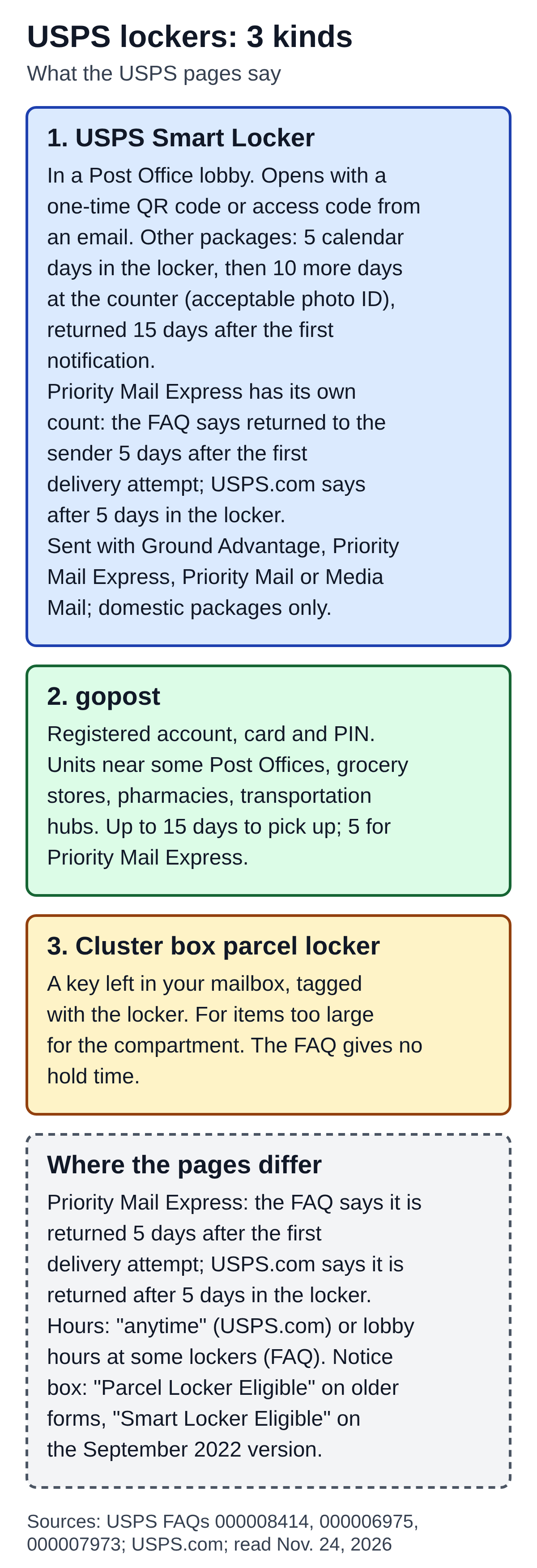
The three lockers side by side
| USPS Smart Locker | gopost | Cluster box parcel locker | |
|---|---|---|---|
| Where | Post Office lobbies | Near certain Post Offices, grocery stores, pharmacies, transportation hubs and more | In a cluster box unit, beside neighborhood delivery and collection boxes, or with PO Boxes in a retail facility |
| How it opens | One-time QR code or access code from an email | gopost card and PIN | A key left in your mailbox, tagged with the locker |
| Account | No account step named for pickup | USPS.com account, then authentication | Not described |
| Time to pick up | Other packages: 5 days in the locker, 10 more at the counter. Priority Mail Express: 5 days, counted from the first delivery attempt (FAQ) or in the locker (USPS.com) | Up to 15 days (5 for Priority Mail Express) | Not stated |
The FAQ calls a Smart Locker “electronic” and “keyless,” and says it provides a “free, secure, and convenient” alternative at Post Offices. The gopost FAQ calls gopost units “automated, secured, self-service parcel lockers” placed in locations such as near Post Offices, grocery stores, pharmacies and shopping centers. The cluster box FAQ defines a parcel locker as a unit installed within a cluster box unit, alongside neighborhood delivery and collection box units, or with PO Boxes in a retail facility, used for parcel and package deliveries.
How a package gets to a Smart Locker
USPS pages describe three routes. From an online store that ships with USPS and offers it, you choose a Smart Locker at checkout. From an individual sender, the sender uses Click-N-Ship or a Post Office self-service kiosk, picks a Smart Locker near you and enters your email address. And a package with a notice can be redelivered to a locker: the FAQ says you can schedule that at usps.com/redelivery, that the option appears only if your local Post Office has a Smart Locker, and that redelivery to a locker cannot be scheduled for another location. The redelivery FAQ adds that a Smart Locker is not available when you request redelivery by phone. Our article on USPS Redelivery: How to Schedule It, Cutoffs and Return Dates covers the other redelivery options.
USPS.com lists these conditions for a package sent to a Smart Locker:
- The sender must use USPS Ground Advantage, Priority Mail Express, Priority Mail (and their corresponding Return services) or Media Mail. Commercial senders can also use Bound Printed Matter and Library Mail.
- Domestic packages only: “No cards, letters, or anything that requires a customs form.”
- The sender must have the recipient’s email address, because the pickup notice and QR code go there.
- The package must fit. USPS.com says the absolute maximum size for a package shipped to a Smart Locker is 22.5 by 18 by 16.5 inches, and that some lockers have smaller limits. The FAQ says the maximum compartment size varies by locker and the maximum weight is 70 pounds.
- If a package cannot be delivered to a Smart Locker, the FAQ says it is held at the Post Office retail counter and the recipient gets an email with the location and instructions.
The FAQ also says Informed Delivery subscribers with a package for a Smart Locker see it in the Daily Digest email if the email address on the package matches the account’s. The digest shows tracking beginning within 3 days of delivery, a note that the package is in a locker and a one-time QR code that stays until pickup and expires after 5 calendar days. For what the digest is, see What Is USPS Informed Delivery? How the Free Preview Works.
Picking up, and the clock
The pickup email has the address and hours of the Post Office, a one-time QR code or access code and instructions. You scan the code at the locker kiosk and the compartment opens. A final email confirms the pickup. The FAQ says the package is held in the locker for 5 calendar days, with a reminder email every day. If you are unable to pick it up in time, you may share your QR code with a trusted person to pick it up for you.
After 5 days, the FAQ says the package is removed from the locker and held at the Post Office retail window for 10 more days, and you bring an acceptable form of identification to the counter. The USPS.com recipient page gives the same timeline: 5 days in the locker, 10 more days at the counter, and return to the sender 15 days after the initial notification. Both describe packages other than Priority Mail Express; the pages treat that service separately (see “Where the USPS pages differ”). In its Local XChange section the FAQ words the end of that clock as follows: at 15 days the package is treated as Undeliverable as Addressed and USPS attempts to mail it back to the seller.
If the QR code does not arrive, the FAQ says to check deleted or junk email, visit the Post Office during retail hours, or call 1-800-ASK-USPS to have the email resent. If it does not scan, it says to brighten the phone screen and clean it, or to enter the six-digit access code printed under the QR code. If neither works, a USPS employee at the location can help during retail hours.
On hours, the FAQ says Smart Lockers in Post Office lobbies give many recipients 24/7 access, that lobby hours are in the pickup email, and that After Hours Access, which it calls free, is available at select Post Offices where the lobby is not open around the clock. The USPS Local XChange page says “many” kiosks are available 24/7 and “some are only available during lobby hours.”
Sending from a Smart Locker
The FAQ says you can return a package from a Smart Locker if you have a Label Broker QR code for a return: you scan it at the locker to print a label, attach it, scan the new label and put the package in a compartment.
USPS Local XChange connects local sellers and buyers, who exchange an item through a Smart Locker. The USPS.com page says the seller needs a free USPS.com account, the locker must be within 50 miles of the seller’s return address, the buyer gives the seller a name and valid email address, and the item must be packaged in a box or polybag and fit the compartment. The seller pays a flat fee, which this article does not give. The FAQ gives the buyer the same 5 days in the locker and 10 more days at the counter, with the package mailed back to the seller 15 days after the initial notification, and that the label cannot be refunded once it has been scanned at the kiosk. The FAQ also lists items that cannot be used: cremated remains, live animals, day-old poultry, perishables, hazmat items affected by extreme temperature and “Restricted Matter.” The seller and buyer cannot use the same contact information.
gopost and the cluster box locker, briefly
For gopost, the FAQ says you register with a free USPS.com account, then authenticate, either at a gopost unit by scanning a driver’s license or state ID, or at a Post Office with a government-issued photo ID. You get an account number, a card and a PIN, you are not assigned a specific locker, and the units are available 24 hours a day, 7 days a week “as long as the gopost unit is operational and available to the public.” When you order, the address uses your name, your gopost account number and the gopost unit’s address. You have a maximum of 15 days to pick up (5 for Priority Mail Express), after which the package is returned to the sender. The FAQ lists extra services it does not accept, including Certified Mail, Registered Mail, Adult Signature and Restricted Delivery.
For a cluster box, the FAQ says the parcel locker is for items too large to fit in an individual compartment. A key is left in your mailbox with a tag showing the parcel locker that holds the item; you insert it in that locker, and the key stays in the locker once inserted. Letter carriers deliver accountable mailpieces to the point of address instead. The FAQ gives no hold time for this kind. Our article on USPS Tracking Status reports the tracking guide’s version of the same key rule. For PO Box customers, our How Does a USPS PO Box Work? Sizes, ID and Service Periods article reports that USPS.com says an oversized package goes either to the counter by slip or to a secure parcel locker, including USPS Smart Lockers at select locations.
Why the names overlap on the notice
The redelivery notice (PS Form 3849) has a locker box whose label changed. The PS Form 3849 FAQ says the February 2021 version let the carrier check “Parcel Locker Eligible” for a gopost parcel locker, and the September 2022 version updates that checkmark to “USPS Smart Locker Eligible.” It adds that earlier versions are still in use. The Redelivery FAQ still uses both names: it says the “Parcel Locker Eligible” option is checked if the item is eligible for gopost Parcel Locker Delivery, which is available only at limited ZIP Codes, and also that “Parcel Locker Eligible” is checked on the form if the “USPS Smart Locker” option is available. A notice with an older form or the old label does not tell you which kind of locker it means, and this article does not say how to tell.
Where the USPS pages differ
- Priority Mail Express. The FAQ says Priority Mail Express items are returned to sender 5 calendar days after the initial delivery attempt, “no matter when the ‘USPS Smart Locker’ option is selected.” The redelivery FAQ’s table also says Priority Mail Express is held 5 days after the first attempt. USPS.com’s recipient and shipper pages say that after 5 days in the locker “Priority Mail Express packages will be immediately returned to sender.” So the pages give different points for the count to start: the first delivery attempt in the FAQs, and time in the locker on USPS.com. This article does not say which one applies. If the deadline is close, ask the Post Office that holds the package.
- Hours. The USPS.com recipient page says you can retrieve packages “anytime, anywhere.” The FAQ and the Local XChange page say lobby hours apply at some locations. This article does not say which locations.
- Size. USPS.com’s recipient and shipper pages give an absolute maximum of 22.5 by 18 by 16.5 inches for a package shipped to a locker. The Local XChange page gives a maximum compartment size of 22.5 by 19.5 by 14.5 inches. The FAQ says the maximum varies by locker and that Click-N-Ship shows the limit for the locker you choose.
What the pages do not say
They do not say how many Smart Lockers a Post Office has or how to know a locker is free before a notice arrives, and they do not say how to tell on an older notice which kind of locker is meant. They give no hold time for a cluster box parcel locker. They do not say whether ID is checked at the locker itself or only at the counter after 5 days, and they do not say how the locker treats a QR code that has been shared.
Sources
All pages were read on November 24, 2026.
- USPS FAQ, “USPS Smart Locker,” Article 000008414, July 28, 2026. https://faq.usps.com/s/article/USPS-Smart-Locker
- USPS FAQ, “What is a Cluster Box? What is a Parcel Locker?,” Article 000006975, August 4, 2026. https://faq.usps.com/s/article/What-is-a-Cluster-Box
- USPS FAQ, “gopost,” Article 000007973, October 22, 2026. https://faq.usps.com/s/article/gopost
- USPS.com, “Smart Lockers for Package Recipients” (no update date shown). https://www.usps.com/smart-lockers/package-recipients.htm
- USPS.com, “Smart Lockers for Package Shippers” (no update date shown). https://www.usps.com/smart-lockers/package-shippers.htm
- USPS.com, “Local XChange” (no update date shown). https://www.usps.com/smart-lockers/local-xchange.htm
- USPS FAQ, “Redelivery – The Basics,” Article 000005320, September 16, 2026. https://faq.usps.com/s/article/Redelivery-The-Basics
- USPS FAQ, “PS Form 3849 Redelivery Notice,” Article 000006180, June 29, 2026. https://faq.usps.com/s/article/PS-Form-3849-Redelivery-Notice
- USPS FAQ, “What are the Second and Final Notice and Return Dates for Redelivery?,” Article 000006169, April 7, 2026. https://faq.usps.com/s/article/What-are-the-Second-and-Final-Notice-and-Return-Dates-for-Redelivery