USPS’s status guide says an “Out for Delivery” scan means the package “will be delivered by a carrier today,” but USPS also says “USPS Tracking does not expedite or guarantee delivery.” The guide says that if the package has not arrived after 1 full postal business day has passed following that scan, you can use the tracking number to submit a service request to your local Post Office. Other statuses have other waits, and the guide does not use one rule for all of them.
This article covers two USPS FAQ pages: “Where is my package? Tracking Status Help” (Article 000006077, dated September 29, 2026) and “USPS Tracking® – The Basics” (Article 000007991, dated September 17, 2026). The wording is as of November 13, 2026. The status guide lists 27 statuses in five groups; this article follows those groups and spends most of its space on the statuses where the guide tells you to do something. It gives no prices. It does not cover international tracking, claims and refunds, how a service request is handled, or other carriers.
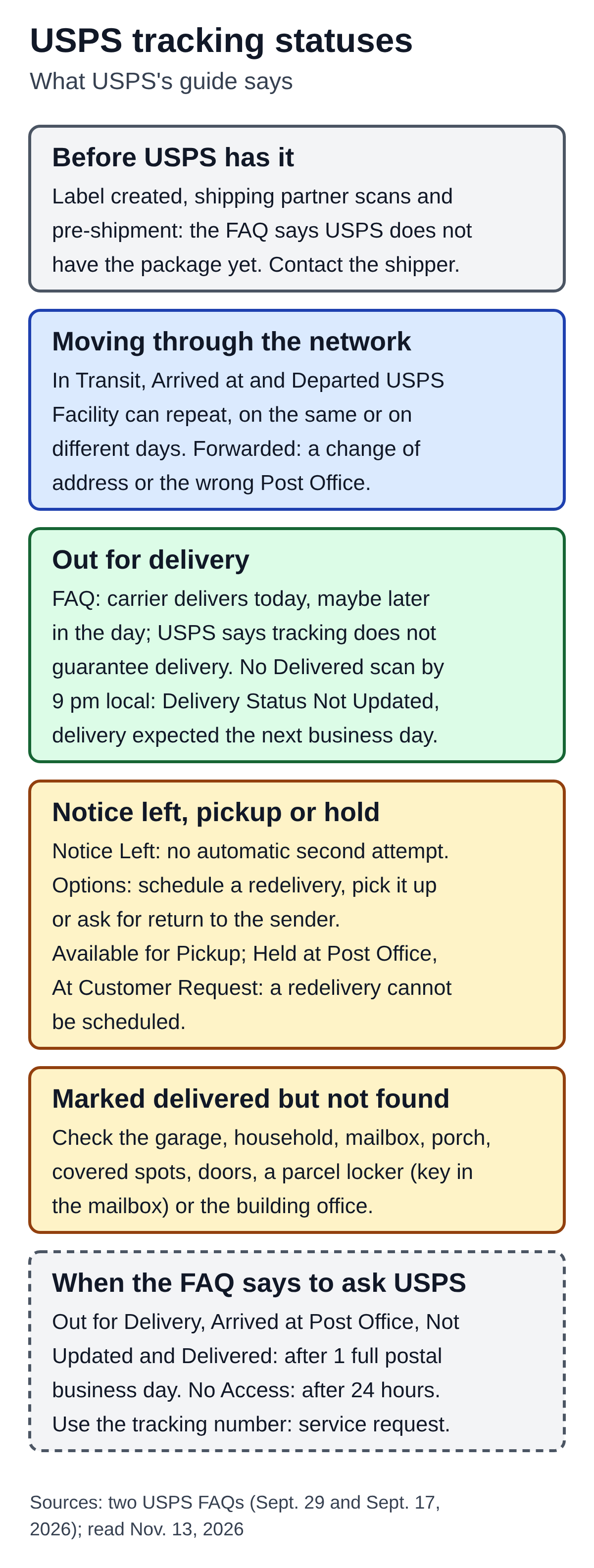
What USPS Tracking does and does not promise
The “Basics” FAQ is plain about the limits. It says “USPS Tracking does not expedite or guarantee delivery.” Tracking can start as soon as the sender or a shipping partner tells USPS electronically to expect a package, continues when USPS accepts it, and ends when the item is delivered or picked up. The FAQ says scanning information “is updated throughout the day as scans become available,” and it points to the Scan Event Status page for what a specific status means.
Two more points from the same FAQ. First, First-Class Mail postcards, letters and flats “are not eligible for USPS Tracking service,” although letters and flats can get extra services such as Certified Mail or Registered Mail that carry barcodes (our Certified Mail article covers one of them). Second, you may see an Expected Delivery Window, which the FAQ describes as “a 2-hour slot of time when you can expect your package to arrive,” and adds that “Delivery within that time is not guaranteed.” If the status is “Alert,” the FAQ says to check USPS Service Alerts first, because weather and other events can cause delays.
The FAQ also says the absence of a delivery scan “does not necessarily indicate that the item was not delivered”: the piece may have been delivered without the scan being captured, and it suggests contacting the sender or recipient to confirm.
Before USPS has the package
The first group in the status guide, “Acceptance / Preshipment,” covers statuses that come before USPS handles the package. For the statuses that mention a shipping partner (picked up by, arrived at or departed a shipping partner facility, “USPS Awaiting Item,” and “On its Way to USPS”), the guide says “USPS does not have possession of the package” and tells you to contact the shipper with questions. “Shipping Label Created, USPS Awaiting Item” and “Pre-Shipment, USPS Awaiting Item” mean a shipping label has been created with a USPS Tracking number and “The package has not yet been given to USPS.” The advice is again to contact the shipper.
Two statuses in that group describe USPS handling. “USPS In Possession of Item” means USPS has received or picked up the package and will begin processing it, and the guide says no action is needed. “Shipment Received, Package Acceptance Pending” means a postal facility has received a container or pallet of many packages but has not started processing, and each package will get its own acceptance scan once the container is opened.
Moving through the network
For “In Transit,” “Arrived at USPS Facility” and “Departed USPS Facility,” the guide says the package “is currently being processed or transported to your delivering Post Office.” It adds that these scans “may appear multiple times from the same facility and/or on different days as it is traveling,” so a repeat is not described as a problem. The guide gives no number of days for this stage.
“Forwarded” and “Forward Processed” mean the package is being forwarded to a different address, which the guide says is “due to a change of address request or because the package is at the wrong Post Office for delivery.” (Our mail forwarding article covers change-of-address forwarding.)
“Arrived at Post Office” is the one status in the “Preparing for Delivery” group. The guide says the package “should arrive today or the next postal business day,” and that if there has been no change in tracking status after 1 full postal business day following the arrival date at your local Post Office and no delivery has occurred, you can use the tracking number to submit a service request.
Out for delivery, and when the delivery scan is missing
“Out for Delivery” means the package “has been prepared for delivery at your local Post Office™ and will be delivered by a carrier today.” The guide notes that “Not all packages are delivered by the same carrier who delivers your regular mail and may arrive at a different time or later in the day.” So a package can arrive at a different time than your letters. This is the guide’s description of what the status means, not a delivery promise: the “Basics” FAQ says “USPS Tracking does not expedite or guarantee delivery,” and says delivery within an Expected Delivery Window “is not guaranteed.”
If no Delivered scan is recorded by 9 pm local time on the day of the Out for Delivery scan, the status changes to “Delivery Status Not Updated” or “Awaiting Delivery Scan.” The guide says this means “we now anticipate delivery of your package on the next business day.” If more than 1 full postal business day has passed since this status and no delivery has occurred, it says to use your tracking number and submit a service request.
If the status is “Held at Post Office, At Customer Request,” the guide says it is due to a USPS Hold Mail, Hold for Pickup or USPS Delivery Instructions request, and that “A redelivery cannot be scheduled for this package.” Packages held under a valid Hold Mail request are handled according to that request (carrier delivery or customer pickup); with no such request, you must pick the package up with a valid photo ID. See our Hold Mail article for the service itself.
Delivery attempts, notices and pickup
This is where the guide’s statuses differ most. In the table, “another attempt” is what the guide says about delivering again.
| Status | What the guide says it means | What it says about another attempt |
|---|---|---|
| No Access to Delivery Location | The carrier could not get to the mailbox, porch or garage. Examples: a vehicle blocking the mailbox, a loose dog, a gated community or locked building, utility work or emergency responders | “We will automatically reattempt delivery the next business day” |
| Notice Left (No Authorized Recipient Available) | The package needs a signature and no one was available to sign; a PS Form 3849 Redelivery Notice was left | “There will be no automatic second delivery attempt” |
| Notice Left (No Secure Location Available) | The carrier did not see a secure place to leave the package and returned it to the Post Office | “There will be no automatic second delivery attempt” |
| Available for Pickup | The package cannot be delivered and can be picked up at your local Post Office by you or an authorized agent | “A redelivery cannot be scheduled for this package” |
In short, the guide describes scheduling a redelivery only for the two “Notice Left” statuses and for “Redelivery Scheduled” and “Reminder to Schedule Redelivery of your Item”; for “Available for Pickup” and “Held at Post Office, At Customer Request” it says a redelivery cannot be scheduled. For the two “Notice Left” statuses, the guide lists three options: schedule a redelivery using the tracking number or the barcode number on the notice (if delivery to a USPS Smart Locker is available, the notice says so); pick the package up at the Post Office listed on the notice, where an authorized agent can pick it up for you and valid photo ID is required; or request that it be returned to the sender using the Redelivery application. It adds that if you do not claim the package “within the time limit,” it will be returned to the sender, and it does not give that time limit in these entries. “Redelivery Scheduled” and “Reminder to Schedule Redelivery of your Item” lead to the same options. For “Available for Pickup,” the guide says to pick the package up beginning the next business day or request that it be returned to the sender.
“No Access to Delivery Location” has its own wait. After saying that no action is needed and that delivery will be reattempted automatically, the guide says that if it has been more than 24 hours since that status, you can use your tracking number and submit a service request.
Two statuses mean the package is going back. For “Insufficient Address” and “No Such Number,” the guide says the package is being returned to the sender because part of the delivery address is missing, incomplete or incorrect, and that the sender will need to reship the item with new postage. (For how USPS pages describe addressing, see our article on addressing an envelope.)
Marked delivered, but not at your door
For “Delivered,” the guide says the package has been delivered “with a recorded date, time and delivery location.” If you cannot find it, it says the carrier may have put it somewhere safer, and lists places to check: the garage, other people in your household, the mailbox (packages can come separately from your regular mail, so check again later in the day), the porch, areas protected from weather, areas out of street view such as under a mat or near a back entrance, and exterior doors. If you have a multi-unit community mailbox and there is a key in your regular mail compartment, the guide says your package is in a parcel locker, and the key tag shows the locker number. In an apartment or condo, it says to contact the building’s management office.
If you still cannot find it and it has been more than one postal business day since the “delivered” scan, the guide says to visit the “email us” page on usps.com to submit a service request to your local Post Office for eligible items. For mail that has gone missing in other ways, the separate Missing Mail search is covered in its own article.
When the guide says to submit a service request
The guide uses different waits for different statuses, summarized below. Each wait is quoted from that status’s entry, and the table does not add any rule of its own.
| Status | Wait in the guide | Condition in the guide |
|---|---|---|
| Delivered | More than one postal business day since the “delivered” scan | The package cannot be found |
| Out for Delivery | After 1 full postal business day has passed following the scan | The package has not been delivered |
| Arrived at Post Office | After 1 full postal business day following the arrival date | No change in tracking status and no delivery |
| Delivery Status Not Updated / Awaiting Delivery Scan | More than 1 full postal business day since this status | No delivery has occurred |
| No Access to Delivery Location | More than 24 hours since this status | Use the tracking number |
The guide does not define “1 full postal business day,” and “24 hours” is used only for No Access. The article does not say how the two relate.
What the pages do not say
Neither FAQ says how long the In Transit stage can last, or when a package is “late.” The “Basics” FAQ sends you to the Mail Delivery Standards chart in “Delayed mail and packages?” for that, which this article did not read. Neither says what happens after you submit a service request or how long it takes, and the guide says “eligible items” without listing them. The guide does not give the time limit for claiming a package after a notice. Records are kept for a limited time: the “Basics” FAQ gives 120 days for USPS Tracking, one year for Signature Confirmation, and two years for several services including Certified Mail, Priority Mail Express and Registered Mail. The text and email updates it describes stay active for 2 weeks after the request; the FAQ also mentions Informed Delivery as another option, covered in our Informed Delivery article.
Sources
- USPS FAQ, “Where is my package? Tracking Status Help” (Article 000006077, September 29, 2026): https://faq.usps.com/s/article/Where-is-my-package
- USPS FAQ, “USPS Tracking® – The Basics” (Article 000007991, September 17, 2026): https://faq.usps.com/s/article/USPS-Tracking-The-Basics